


Logstash is a powerful log collection and event processing engine used for collecting, parsing, transforming, and forwarding logs and event data from multiple sources. It is one of the core components of the Elastic Stack and is widely used for centralized logging, monitoring, and data processing.
Logstash helps organizations manage large amounts of log data efficiently by collecting logs from different systems, processing them into a structured format, and forwarding them to storage or analysis platforms.
What is Logstash?
Logstash is an open-source data processing pipeline that collects data from multiple input sources, transforms the data, and sends it to different destinations.
It acts as a centralized system for:
- Log collection
- Event processing
- Data transformation
- Data forwarding
- Monitoring and analytics
Logstash can handle logs and event data from servers, applications, databases, cloud platforms, and network devices.
How Logstash Works
Logstash works through a pipeline architecture consisting of three major stages:
- Input
- Filter
- Output
The pipeline allows data to flow from different sources to multiple destinations after processing and transformation.
Components of a Logstash Pipeline
1. Input Plugins
Input plugins collect data from various sources.
Logstash supports several input methods including:
- File monitoring
- Syslog collection
- TCP/UDP sockets
- HTTP endpoints
- Message queues
- Cloud services
Examples of input sources:
- Application logs
- Server logs
- Network devices
- Databases
- Web servers
Input plugins gather raw log and event data for processing.
2. Filter Plugins
Filter plugins process and transform collected data.
Filters help:
- Parse logs
- Extract fields
- Modify event data
- Convert formats
- Remove unwanted information
Common Logstash filters include:
- Grok
- Mutate
- Date
- GeoIP
- JSON
Filters make raw logs easier to analyze and search.
3. Output Plugins
Output plugins send processed data to storage or analysis systems.
Logstash supports several output destinations such as:
- Elasticsearch
- Local files
- MongoDB
- Kafka
- Redis
- Amazon S3
- Google Cloud Storage
This flexibility allows organizations to route logs to different systems based on their requirements.
Logstash Pipeline Overview
A Logstash pipeline consists of:
Input → Filter → Output
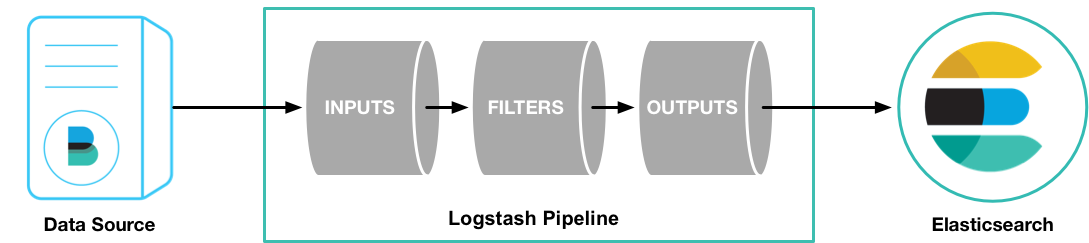
Pipeline Flow
- Input plugins collect logs and events
- Filter plugins process and structure the data
- Output plugins forward data to storage or monitoring systems
This architecture makes Logstash highly flexible and scalable.
Input Plugins |
Filter Plugins |
Output Plugins |
Beats |
Aggregate |
CSV |
Elasticsearch |
CSV |
Elasticsearch |
Kafka |
Date |
|
Graphite |
geoip |
File |
Heartbeat |
grok |
Graphite |
Tttp |
Json |
Http |
JDBC |
sleep |
Jira |
File |
urlencode |
Kafka |
Log4j |
UUID |
Nagios |
Redis |
XML |
Redis |
Stdin |
|
Stdout |
TCP |
|
S3 |
|
|
|
TCP |
|
|
|
UDP |
Logstash configuration file contains the input and output element and the optional element filter. The Input plugin consumes the data from the source and the filter plugin modifies the data as you specify and an output plugin will write the data to the destination.
Configuration Files, Logs, and the Settings Files in the Appropriate Locations for the System
Type |
Description |
Default Location |
home |
Home directory Installation |
/usr/share/logstash |
bin |
Binary scripts including logstash to start Logstashand logstash -plugin to install plugins |
/usr/share/logstash/bin |
settings |
Configuration files, JVM.options and startup.options including logstash.yml |
/etc/logstash |
conf |
Logstash pipeline configuration files |
/etc/logstash/conf.d/*.conf |
logs |
Log files |
/var/log/logstash |
plugins |
Local, non-Ruby-Gem plugin files. Each plugin is contained in a subdirectory. Recommended for development only. |
/usr/share/logstash/plugins |
data |
Data files used by logstash and its plugins for any persistence needs |
/var/lib/logstash |
Features of Logstash
Logstash provides several powerful features for log management and data processing.
- Centralized Log Collection : Collect logs from multiple servers and applications into a single platform.
- Real-Time Data Processing : Process and forward logs in real time for immediate analysis and monitoring.
- Multiple Plugin Support : Supports hundreds of plugins for inputs, filters, and outputs.
- Data Transformation : Convert unstructured logs into structured and searchable formats.
- Scalability : Capable of processing large volumes of logs and event data efficiently.
Common Use Cases of Logstash
1. Log Analysis
Logstash is commonly used with Elasticsearch and Kibana for centralized log analysis.
Popular data stores include:
- Elasticsearch
- MongoDB
These platforms help analyze logs and generate reports.
2. Data Archiving
Organizations can archive logs for long-term storage using:
- Amazon S3
- Google Cloud Storage
Archived logs are useful for compliance and auditing purposes.
3. Monitoring and Alerting
Logstash integrates with monitoring tools such as:
- Nagios
- Graphite
This helps administrators monitor system performance and detect issues quickly.
Advantages of Logstash
Some major advantages of Logstash include:
- Centralized log management
- Real-time event processing
- Flexible plugin architecture
- Easy integration with Elastic Stack
- Scalable data pipeline processing
- Supports multiple data sources and destinations
These features make Logstash a popular choice for enterprise logging solutions.
Logstash and Elastic Stack
Logstash is commonly used as part of the Elastic Stack (ELK Stack):
- Elasticsearch → Data storage and search
- Logstash → Data collection and processing
- Kibana → Data visualization and dashboards
Together, these tools provide a complete log management and analytics solution.
Conclusion
Logstash is a powerful and flexible log collection and processing engine designed for centralized logging and event management. By using input, filter, and output plugins, Logstash can collect logs from multiple sources, process them into structured formats, and forward them to different storage or monitoring platforms.
Its scalability, plugin support, and integration capabilities make Logstash an essential tool for modern log analysis, monitoring, and data processing environments.
If you require help, contact SupportPRO Server Admin
Facing issues?
Our technical support
engineers can solve it.


