


Managing databases through a lightweight and simple interface can save administrators a lot of time. Adminer is a popular PHP-based database management tool that offers an efficient alternative to phpMyAdmin. It supports multiple database systems and provides a clean interface for managing databases, tables, users, and SQL queries.
In this guide, we’ll explain what Adminer is, its key features, prerequisites, and how to install and access Adminer on a Linux server.
What is Adminer?
Adminer is an open-source database management tool written in PHP. It allows administrators and developers to manage databases directly from a web browser.
Unlike traditional database tools that focus mainly on MySQL, Adminer supports several database engines, including:
- MySQL
- MariaDB
- PostgreSQL
- SQLite
- Oracle
- MongoDB
Because it is lightweight and easy to deploy, Adminer is widely used for quick database administration tasks.
Features of Adminer
Adminer includes several useful database management features, such as:
- Create, modify, and delete databases and tables
- Manage views, triggers, procedures, and permissions
- Execute SQL queries directly from the interface
- Import and export databases
- Export database structures and data to SQL or CSV format
- Manage users and database variables
- Lightweight single-file installation
Prerequisites
Before installing Adminer, ensure your server has the following:
- Apache or another web server
- PHP 5 or later with sessions enabled
- A supported database server such as MySQL or PostgreSQL
- Access to the server through SSH
Installing Adminer on Linux
Step 1: Download Adminer
Navigate to your web server document root and download the latest Adminer package.
wget http://downloads.sourceforge.net/adminer/adminer-4.0.2.zipStep 2: Extract the Package
Unzip the downloaded file.
unzip adminer-4.0.2.zipStep 3: Set Proper Permissions
Assign the correct ownership to the extracted directory.
chown -R nobody. adminer-4.0.2Accessing Adminer
Once the installation is complete, open your browser and access Adminer using your server hostname or IP address.
http://localhost/adminer-4.0.2/admineror
http://your-server-ip/adminer-4.0.2/adminerYou will see the Adminer login page.
Enter your database server details, username, and password to log in.
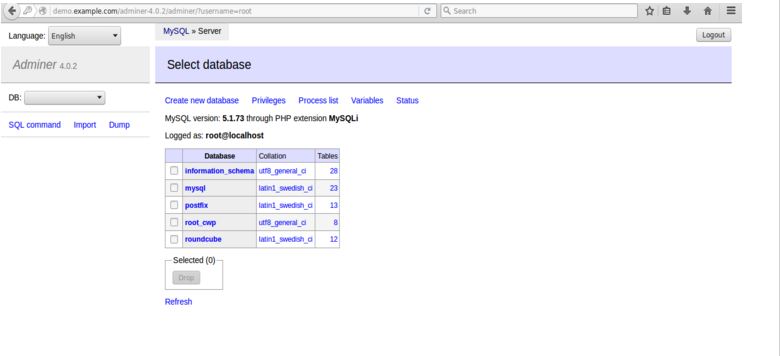
Creating a Database in Adminer

After logging in:
- Select the database server
- Click on “Create Database”
- Enter the database name
- Save the changes
The new database will now be available for use.
Conclusion
Adminer is a lightweight yet powerful database management tool for Linux servers. Its simple setup process, support for multiple database systems, and user-friendly interface make it a great alternative to phpMyAdmin. Whether you need to manage databases, execute SQL queries, or export data, Adminer provides an efficient solution for database administration tasks.
If you require help, contact SupportPRO Server Admin
Facing issues?
Our technical support
engineers can solve it.


