


Linux servers can handle thousands of operations every second. However, they can still slow down when storage devices become overloaded. One of the clearest signs of a storage problem is high I/O wait. When I/O wait increases, applications respond slowly, backups take longer, and users may notice delays.
This guide explains what I/O wait is, how disk bottlenecks occur, common symptoms, monitoring tools, and practical ways to troubleshoot and optimise disk performance in Linux environments.
In this guide, you’ll learn:
- What I/O wait means
- What causes disk bottlenecks
- How to detect storage issues
- Which Linux tools can help
- Ways to improve disk performance
What Is I/O Wait in Linux?
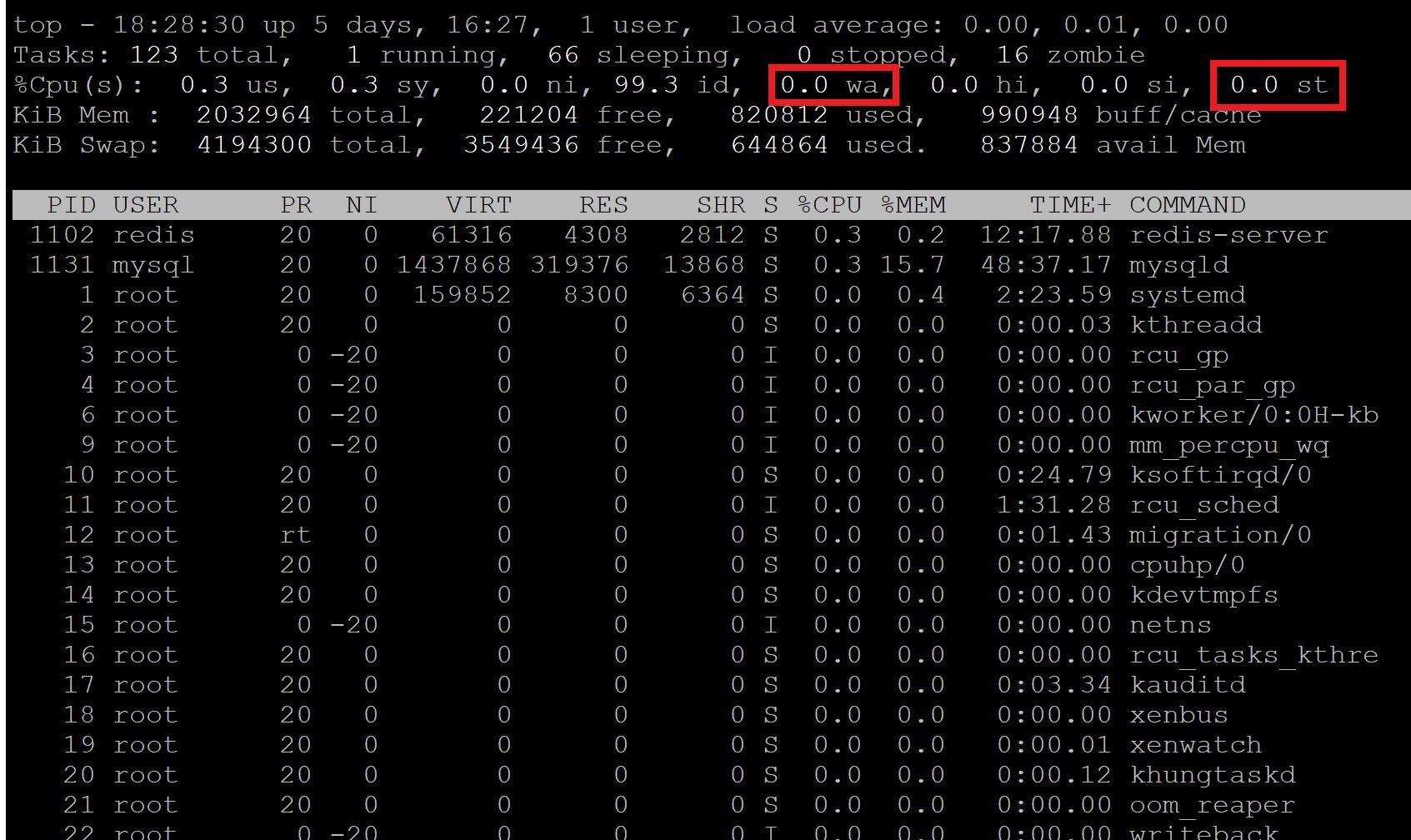
I/O wait shows how long the CPU spends waiting for storage operations to finish. These operations usually involve disks such as HDDs, SSDs, or network storage devices.
In Linux system monitoring tools, I/O wait is displayed as %wa. A high %wa value generally means the CPU is ready to process tasks, but it must wait for the storage subsystem to respond.
For example:
- Reading large database files
- Writing backup archives
- Accessing slow disks
- Heavy logging activity
- Running multiple virtual machines on shared storage
All of these activities can increase I/O wait.
A small amount of I/O wait is normal. However, consistently high values may indicate storage performance limitations.
Why Do Disk Bottlenecks Happen?
A disk bottleneck happens when a storage device cannot handle all incoming read and write requests. As requests pile up, applications must wait longer for data. This can slow down the entire server.

Common causes include:
1. Slow Storage Hardware
Traditional HDDs have mechanical limitations and can become overwhelmed under heavy workloads. SSDs provide significantly better IOPS (Input/Output Operations Per Second), but even SSDs have limits.
2. Excessive Concurrent Processes
Multiple applications performing intensive disk operations simultaneously can saturate storage bandwidth.
Examples include:
- Backup jobs
- Malware scans
- Database queries
- Large file transfers
- Virtual machine snapshots
3. Insufficient RAM
Low memory availability forces Linux to use swap space more frequently. Since swap resides on disk, excessive swapping increases disk activity and I/O wait.
4. Poor Filesystem Performance
Fragmented filesystems, improper mount options, or outdated filesystem types can reduce disk efficiency.
5. RAID or Storage Controller Issues
Misconfigured RAID arrays or failing controllers may introduce latency and slow down read/write operations.
Common Symptoms of High I/O Wait
Systems experiencing disk bottlenecks often show noticeable performance degradation.
Typical symptoms include:
- Slow website or application response times
- Delayed SSH logins
- High server load averages
- Applications freezing temporarily
- Backup jobs taking longer than expected
- Database latency spikes
- Increased swap usage
In severe cases, the entire server may appear unresponsive even when CPU usage remains relatively low.
Monitoring I/O Wait in Linux
Linux provides several built-in tools for identifying storage-related issues.
Using top
The top command displays real-time CPU statistics, including I/O wait.
topLook for the %wa field:
%Cpu(s): 12.5 us, 5.0 sy, 30.0 waA consistently high %wa value may indicate storage delays.
Using iostat
The iostat utility provides detailed disk performance statistics.
iostat -x 2Important metrics include:
- %util — Disk utilization percentage
- await — Average I/O wait time
- r/s and w/s — Read/write requests per second
If %util approaches 100%, the disk may be saturated.
Using iotop
iotop identifies processes consuming the most disk I/O.
iotopThis tool is particularly useful for locating problematic applications or backup processes.
Using vmstat
The vmstat command provides information about memory, CPU, and I/O activity.
vmstat 2Pay attention to:
- wa column for I/O wait
- Swap activity indicators
- Block input/output values
How Disk Bottlenecks Affect Performance
Disk bottlenecks impact more than just storage speed. Since many applications depend on quick disk access, delays can cascade across the entire system.
For example:
- Databases may struggle to retrieve records quickly
- Web servers may experience slower page generation
- Backup operations may overlap with production workloads
- Virtual machines may compete for shared storage resources
Even powerful CPUs and large memory allocations cannot compensate for severely constrained storage performance.
How to Reduce High I/O Wait
Fixing disk performance issues usually requires three things:
- Better hardware
- Smarter workload management
- Regular monitoring
Upgrade to SSD Storage
Replacing HDDs with SSDs is one of the most effective ways to reduce I/O wait.
Benefits include:
- Faster read/write operations
- Lower latency
- Improved application responsiveness
- Better multitasking performance
Optimize Backup Scheduling
Running backups during peak traffic periods can overload disks.
Consider:
- Scheduling backups during off-peak hours
- Using incremental backups
- Limiting simultaneous backup jobs
Increase Available RAM
Additional memory reduces swap usage and minimises reliance on disk for temporary data storage.
Tune Database Performance
Databases frequently generate heavy disk activity.
Optimization techniques include:
- Adding indexes
- Increasing query efficiency
- Using caching solutions
- Adjusting buffer sizes
Monitor Disk Health
Failing disks can cause abnormal latency.
smartctl -a /dev/sdaRegular health checks help detect hardware problems before failures occur.
Separate Workloads
If possible, isolate workloads onto different disks or storage volumes.
For example:
- Operating system on one drive
- Databases on another
- Backups on separate storage
This reduces contention between applications.
Conclusion
Understanding I/O wait and disk bottlenecks is essential for maintaining healthy Linux systems. High I/O wait is often a warning sign that your storage system is struggling.
By using tools such as top, iostat, iotop, and vmstat, administrators can quickly find the source of the problem. Upgrading storage, adding memory, and optimising workloads can greatly improve performance.
A healthy storage system helps keep applications fast, stable, and reliable.
A well-optimised storage subsystem not only improves performance but also increases server reliability and user experience in production environments.
If you have questions, need technical guidance, or want expert assistance in building or managing your server infrastructure, the team at SupportPRO is here to help. Reach out to our specialists to discuss your requirements and discover how professional server management can support your business growth.
Facing issues?
Our technical support
engineers can solve it.


