


Many developers and DevOps engineers who work with Kubernetes eventually face the CrashLoopBackOff error. It can look scary at first. A container starts, crashes, and then keeps restarting again and again. This affects your application’s reliability and availability.
If you have been using Kubernetes for some time, you have probably seen this error. The good news is that CrashLoopBackOff is common. It is also easy to understand once you know how Kubernetes handles container failures.
Kubernetes assigns the status CrashLoopBackOff when a container inside a Pod keeps failing shortly after it starts. Kubernetes tries to restart the container automatically. If it continues to fail, Kubernetes increases the waiting time between restart attempts. This delay is called a “back-off.” That is why the status is named CrashLoopBackOff.
You may find this by typing the command below:
kubectl get podsYou might see something like this:
my-app-5d9fbd9d78-h6k9s 0/1 CrashLoopBackOff 5 (30s ago) 2m

Common Causes of CrashLoopBackOff
CrashLoopBackOff happens when a container keeps crashing after startup. Here are the main reasons:
1. Application Errors
- Bugs or missing dependencies
- Unhandled exceptions
Fix the code, rebuild the Docker image, push it, and redeploy the Pod.
2. Configuration Issues
- Missing or invalid environment variables
- Incorrect ConfigMaps or Secrets
- Wrong file paths or volume mounts
- Dependent services (DB or API) not running
- Incorrect command or entry point
3. Resource Limits
- Not enough memory or CPU
- Container terminated due to OOMKilled
Adjust resource requests and limits if needed.
4. Probe Failures
- Incorrect liveness or readiness probe settings
- Wrong health check path or port
5. File or Permission Problems
- Missing files
- Insufficient access permissions
6. Image Pull Issues
- Image not found in registry
- Wrong image tag
- Incorrect image pull secret credentials
Identifying the exact cause from logs and Pod events helps resolve the issue quickly.
How to Find Out What’s Wrong with CrashLoopBackOff
Step 1: Check the Pod Logs
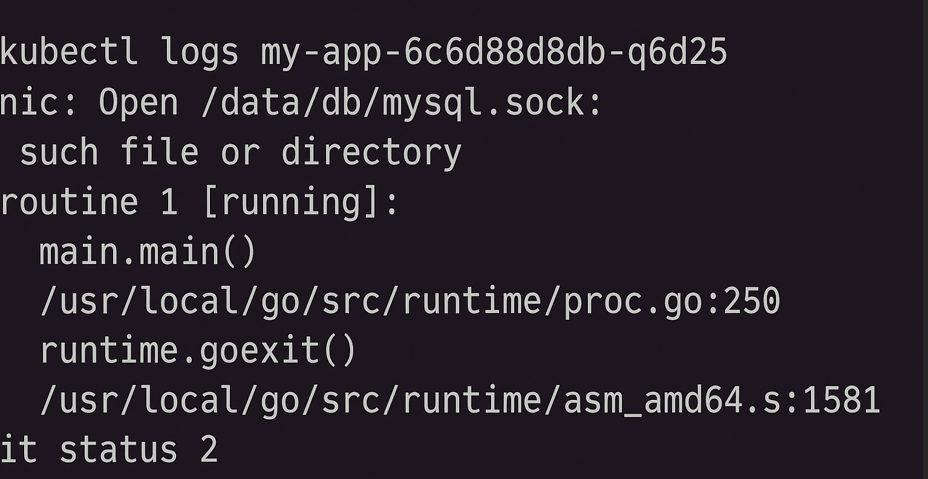
Use kubectl logs to find out what’s wrong inside the container.
kubectl logs --previousThe –previous flag shows logs from the last container instance. This is helpful because the current one may not have been running long enough to create logs. Look for stack traces, missing files, wrong settings, and so forth.
Step 2: Describe the Pod
To discover more about what transpired in the pod, use the describe command:
kubectl describe pod
Look for:
- Events area: Look for OOMKilled, authorisation denied, and probe failures.
- What the container looks like: It tells you exactly why the job was over.

Step 3: Look at the Container Command and Args
The command or args for your deployment are not set up correctly. YAML can block containers from working immediately away.
Take a look at your pod or deployment spec:
containers:
– name: my-app

    image: my-image

    command: [“node”, “app.js”]
Step 4: Look at the resource limits
It could be taking too much memory or CPU if the container is getting OOMKilled.
Check out what describe pod gives you:
State:          Terminated
Reason:         OOMKilled
Update your deployment:
resources:
  limits:
    memory: "512Mi"
 cpu: "500m"
You may need to adjust how you utilise your software or add extra RAM or CPU.
Step 5: Check to see if it is ready and alive Probes
If probes keep failing, Kubernetes might delete the container and start over.
If the probe fails:
livenessProbe:
httpGet:
path: /health
port: 8080
initialDelaySeconds: 5
periodSeconds: 10
Make sure you can go to the /health endpoint at the right time and port.
Step 6: Look at the Secrets and ConfigMaps
Your app might not launch if a config value is missing or inaccurate.
Make sure that the config is set up correctly and can be reached:
envFrom:
– configMapRef:
name: app-config
Make sure that the ConfigMap or Secret you are talking about is real.
Optional: Run in Debug Mode
You may either run a debug pod with the same image to explore around the filesystem or type the command by hand:
kubectl run debug –rm -i –tty –image=my-image — bash
Then, manually start the app:
node app.js
Example of the Last Fix
If this is what your logs say:
Error: Missing environment variable DB_HOST
Then your fix might be to update your deployment:
env:
– name: DB_HOST
value: “mysql-service”
Apply the updated deployment:
kubectl apply -f deployment.yaml
Look at the pod again:
kubectl get pods -w
Best Ways to Avoid CrashLoopBackOff
You can reduce CrashLoopBackOff errors by following a few simple best practices:
- Implement proper error handling and detailed logging in your application.
- Configure health probes carefully. Give your application enough startup time before enabling liveness or readiness checks.
- Set realistic CPU and memory limits based on performance testing and profiling.
- Always verify ConfigMaps and Secrets before deploying them.
- Use liveness and readiness probes correctly so Kubernetes knows when to restart a container.
- Set
restartPolicy: Neverfor jobs that are not meant to restart automatically. - Define resource requests and limits carefully to avoid OOMKilled errors.
- Validate container images through CI/CD pipelines before deploying to production.
Conclusion
CrashLoopBackOff errors can be frustrating, but they are usually easy to fix with a structured approach. Start by checking the logs to understand why the Pod crashed. In most cases, the issue is caused by incorrect configuration, missing dependencies, or insufficient resources.
FAQs
1. What is CrashLoopBackOff in Kubernetes?
CrashLoopBackOff is a status that occurs when a container repeatedly crashes after starting, and Kubernetes delays restart attempts with a back-off mechanism.
2. What causes CrashLoopBackOff errors?
Common causes include application bugs, incorrect configurations, insufficient resources, failed health probes, and missing dependencies.
3. How can I check why my Pod is crashing?
Use the following commands:
kubectl logs --previousto check container logskubectl describe podto view events and error details
4. How do I fix CrashLoopBackOff errors?
Identify the root cause through logs, then fix issues like environment variables, resource limits, probes, or application errors, and redeploy.
5. How can I prevent CrashLoopBackOff issues?
Follow best practices like proper logging, correct probe configuration, setting resource limits, and validating ConfigMaps and Secrets before deployment.
If you need help diagnosing a CrashLoopBackOff issue or improving your Kubernetes environment, expert support can help you resolve problems faster, reduce downtime, and maintain a stable production setup.
Facing issues?
Our technical support
engineers can solve it.


