

For over a decade, cloud architects have had to make a fundamental trade-off: choose object storage for scalability and cost efficiency, or choose file storage for usability and application compatibility.
With the introduction of Amazon S3 Files, that trade-off is no longer necessary.
AWS has effectively redefined how developers interact with storage by enabling S3 buckets to behave like a fully functional file system,without requiring data duplication or migration. This is more than just a feature update; it’s a shift in cloud storage architecture.
1. The Traditional Challenge
Amazon S3 has always been a powerful object storage service. However, it lacked native file system semantics. This meant:
- No direct file editing (objects had to be replaced entirely)
- Complex pipelines to sync data between file systems and S3
- Data duplication across storage systems
As a result, teams often had to choose between:
- S3 for durability and cost
- File systems (like EFS) for usability
2. What is Amazon S3 Files?
Amazon S3 Files introduces a fully managed file system interface for S3. It allows users to access S3 buckets as if they were standard file systems, without moving or duplicating data.
This means applications can:
- Read and write files directly
- Use familiar file operations (create, update, delete)
- Access data using standard tools and libraries
- Applications can interact with S3 using standard file APIs
- Data remains stored as objects in S3
- No duplication or migration is required
In practical terms, S3 becomes both:
- A data lake
- A file system
This convergence is what makes the feature so impactful.
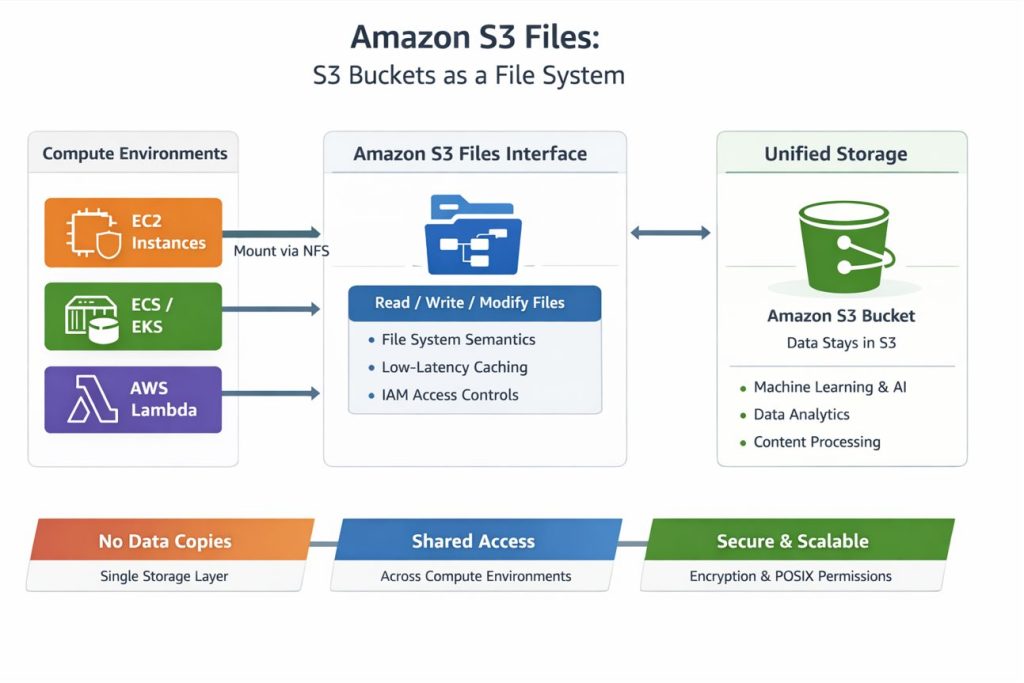
3. Architecture Overview:
At a high level, the architecture introduces a file system abstraction layer that sits between compute services and S3 storage.
Core components include:
- Compute layer (EC2, containers, serverless)
- File system interface (NFS support)
- Intelligent caching layer
- S3 object storage backend
This design allows applications to mount S3 as a file system, enabling familiar operations like:
- Open
- Read
- Write
- Modify
- Delete
4. Accessing an Amazon S3 Bucket:
You can access and work with an Amazon S3 bucket using any of the following methods:
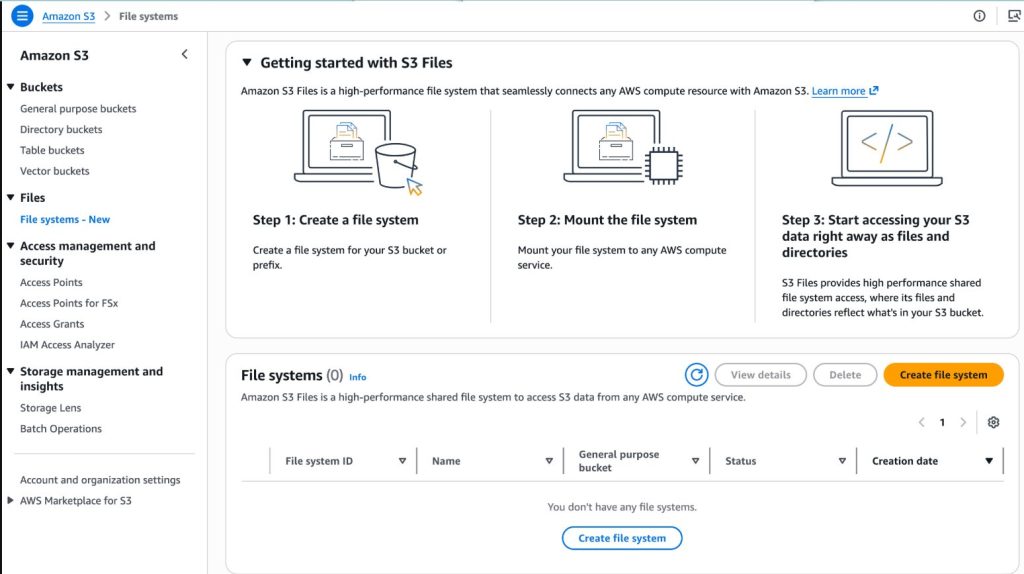
1. AWS Management Console
The AWS Management Console is a web-based interface that allows you to manage AWS services easily.
– Create an AWS account and log in to the console
– Navigate to Amazon S3
– Open S3 Buckets to view and manage your buckets
Path: AWS Console → Amazon S3 → S3 Buckets
2. AWS CLI (Command Line Interface)
The AWS CLI allows you to interact with S3 directly from your terminal.
Steps:
1. Install the AWS CLI
2. Configure your credentials:
Access Key
Secret Key
Default region
3. Use commands to interact with S3
Example command:
aws s3 lsThis command lists all available S3 buckets.
You can explore more commands using:
aws –help3. Programming Scripts (Python with boto3)
You can also access and manage S3 programmatically using Python.
Install the boto3 library
Configure AWS credentials
Use Python scripts to perform operations like uploading, downloading, and listing files.
5. Key Features:
1. Unified Storage Experience
S3 Files eliminates the need to move data between object and file storage. Data remains in S3 while being accessible via file system semantics.
2. Native File Operations
Developers can now modify files directly instead of replacing entire objects. This is especially useful for:
- Log processing
- Incremental updates
- Streaming workloads
3. High Performance with Intelligent Caching
One of the biggest concerns with object storage is latency. S3 Files addresses this with:
- Local caching of frequently accessed data
- Millisecond-level access for active datasets
Cold data is still served from S3, ensuring cost efficiency.
4. Multi-Compute Access
S3 Files integrates seamlessly with:
- EC2 instances
- Kubernetes (EKS)
- Containers (ECS)
- AWS Lambda
This enables shared access across distributed systems without data replication.
5. File System Semantics (NFS Support)
Supports standard file operations with NFS v4.1+, allowing seamless integration with existing applications.
6. Security & Compliance
- Security remains a core strength:
- IAM policies for access control
- Encryption at rest and in transit
- POSIX permissions for file-level control
This hybrid model ensures both enterprise-grade security and developer flexibility.
6. Real-World Impact:
- Machine Learning Pipelines
ML workflows often require :
- Iterative data processing
- Frequent file updates
Previously, data had to be copied from S3 into file systems for training. Now, models can access data directly, reducing latency and cost.
- Data Engineering & Analytics
ETL pipelines benefit from:
- Direct file access
- Simplified architectures
- Reduced data movement
This leads to faster processing and fewer points of failure.
- Content Processing
Applications dealing with media files (video, images) can:
- Edit content directly
- Stream data efficiently
- Avoid redundant storage
7. Benefits at Scale:
1. Eliminating Data Silos
Organizations no longer need separate storage systems for different workloads.
2.Simplifying Architectures
No more:
- Sync scripts
- Data duplication pipelines
- Storage fragmentation
3.Cost Optimization
By keeping all data in S3:
- Storage costs are minimized
- Operational overhead is reduced
8. Challenges & Considerations:
While powerful, S3 Files is not a universal replacement for all file systems.
Consider:
- Latency-sensitive workloads may still require local storage
- Performance tuning may be needed for large-scale deployments
- Understanding caching behavior is critical
9. Conclusion
Amazon S3 Files represents a major evolution in cloud storage. By combining the scalability of object storage with the usability of file systems, AWS has simplified how developers interact with data, unlocking new possibilities for AI, analytics, and distributed systems. Also By enabling file system semantics on top of object storage, AWS has simplified architectures, reduced costs, and unlocked new possibilities for modern workloads.
Looking to design or optimize your cloud storage architecture with Amazon S3 or other AWS services? Get expert support from SupportPro for scalable, secure, and cost-efficient cloud solutions.
Facing issues?
Our technical support
engineers can solve it.


