


In the software development world, an ideal development environment is a key to developing resourceful software products but sometimes maintaining and configuring this development environment becomes a herculean time-consuming task. That’s where the Vagrant virtual machine manager comes into play.
Vagrant solves this by enabling teams to create reproducible, version-controlled development environments using virtual machines and Infrastructure as Code principles.
This guide explains how Vagrant works, how it fits into DevOps workflows, and how to use it effectively.
What Is Vagrant?
Vagrant is an open-source tool used to build and manage portable virtual development environments.
It allows DevOps engineers to:
- Define infrastructure using a Vagrantfile
- Automate VM provisioning
- Standardize environments across teams
- Eliminate “works on my machine” problems
Vagrant works with virtualization providers such as:
- VirtualBox
- VMware
- Hyper-V
- Cloud providers (via plugins)
Each supported environment is called a Provider in Vagrant.
Why Vagrant Matters in DevOps
In DevOps, automation and environment consistency are non-negotiable.
Without Vagrant:
- Developers manually configure local VMs
- Dependency mismatches occur
- Testing environments differ from production
- Onboarding takes hours or days
With Vagrant:
- Infrastructure is defined as code
- Environments can be recreated in minutes
- Teams share identical setups via Git repositories
- CI/CD reliability improves
Understanding Vagrant Architecture
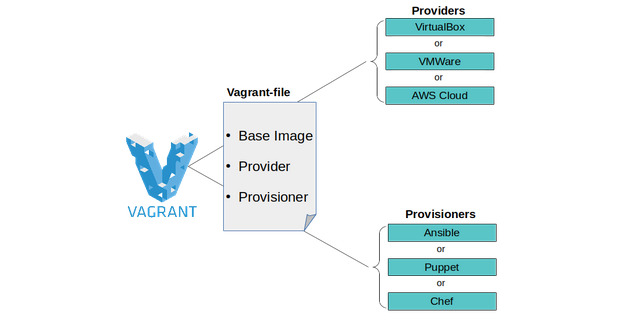
1. Vagrant Boxes
A Vagrant box is a pre-configured base virtual machine image.
Boxes include:
- Operating system
- Pre-installed packages
- Base configurations
You can:
- Download public boxes from Vagrant Cloud
- Customize existing boxes
- Build your own from scratch
2. Vagrantfile (Infrastructure as Code)
The Vagrantfile is the core configuration file written in Ruby syntax.
It defines:
- Base box
- CPU and memory allocation
- Network configuration
- Synced folders
- Provisioning tools
Example:
Vagrant.configure("2") do |config|
  config.vm.box = "ubuntu/jammy64"
  config.vm.network "private_network", ip: "192.168.56.10"
  config.vm.provider "virtualbox" do |vb|
    vb.memory = "2048"
    vb.cpus = 2
  end
end
This enables version-controlled infrastructure inside your repository.
3. Provisioning in Vagrant
Provisioning automates software installation and configuration after VM creation.
Supported provisioners include:
- Shell scripts
- Ansible
- Chef
- Puppet
This allows you to replicate production dependencies locally.
Vagrant Workflow in DevOps
Typical DevOps workflow using Vagrant:
- Clone repository
- Run:
vagrant up- Vagrant:
- Downloads base box
- Creates VM
- Applies network configuration
- Runs provisioners
- Delivers a production-like environment
This entire process takes minutes and eliminates manual setup.
Common Vagrant Commands
| Command | Purpose |
|---|---|
vagrant up | Create and start VM |
vagrant halt | Stop VM |
vagrant suspend | Pause VM |
vagrant destroy | Remove VM |
vagrant reload | Restart with config changes |
vagrant provision | Re-run provisioning |
Vagrant vs Manual Virtual Machines
| Feature | Manual VM Setup | Vagrant |
|---|---|---|
| Automation | Manual | Automated |
| Version Control | No | Yes |
| Reproducibility | Inconsistent | Fully reproducible |
| Team Collaboration | Limited | High |
| DevOps Integration | Minimal | Strong |
Vagrant in CI/CD and Infrastructure as Code
Vagrant supports DevOps pipelines by:
- Creating staging environments identical to production
- Supporting configuration management tools
- Enabling environment recreation for testing
- Reducing onboarding time for developers
- Eliminating configuration drift
Although containerization (Docker, Kubernetes) is popular, Vagrant is still valuable for:
- Full OS-level virtualization
- Testing OS-specific behavior
- Multi-machine environment simulation
- Legacy application development
When Should DevOps Teams Use Vagrant?
Use Vagrant if:
- You need full virtual machines (not just containers)
- Your application depends on specific OS configurations
- You want reproducible local environments
- You need to simulate multi-server setups
- Your team practices Infrastructure as Code
Benefits of Using Vagrant in DevOps
- Faster onboarding
- Environment consistency
- Reduced deployment issues
- Automated provisioning
- Version-controlled infrastructure
- Improved collaboration
- Supports multi-cloud workflows
Conclusion
Vagrant remains a powerful tool in the DevOps ecosystem for creating automated, reproducible, and production-like development environments.
By combining virtualization providers with provisioning tools and Infrastructure as Code practices, Vagrant helps teams eliminate environment inconsistencies and accelerate software delivery.
If your DevOps team needs assistance with environment automation, server configuration, or infrastructure optimization, expert support can help streamline your workflow and reduce deployment risks.
In Case any Doubt, Contact SupportPro .
Facing issues?
Our technical support
engineers can solve it.


