

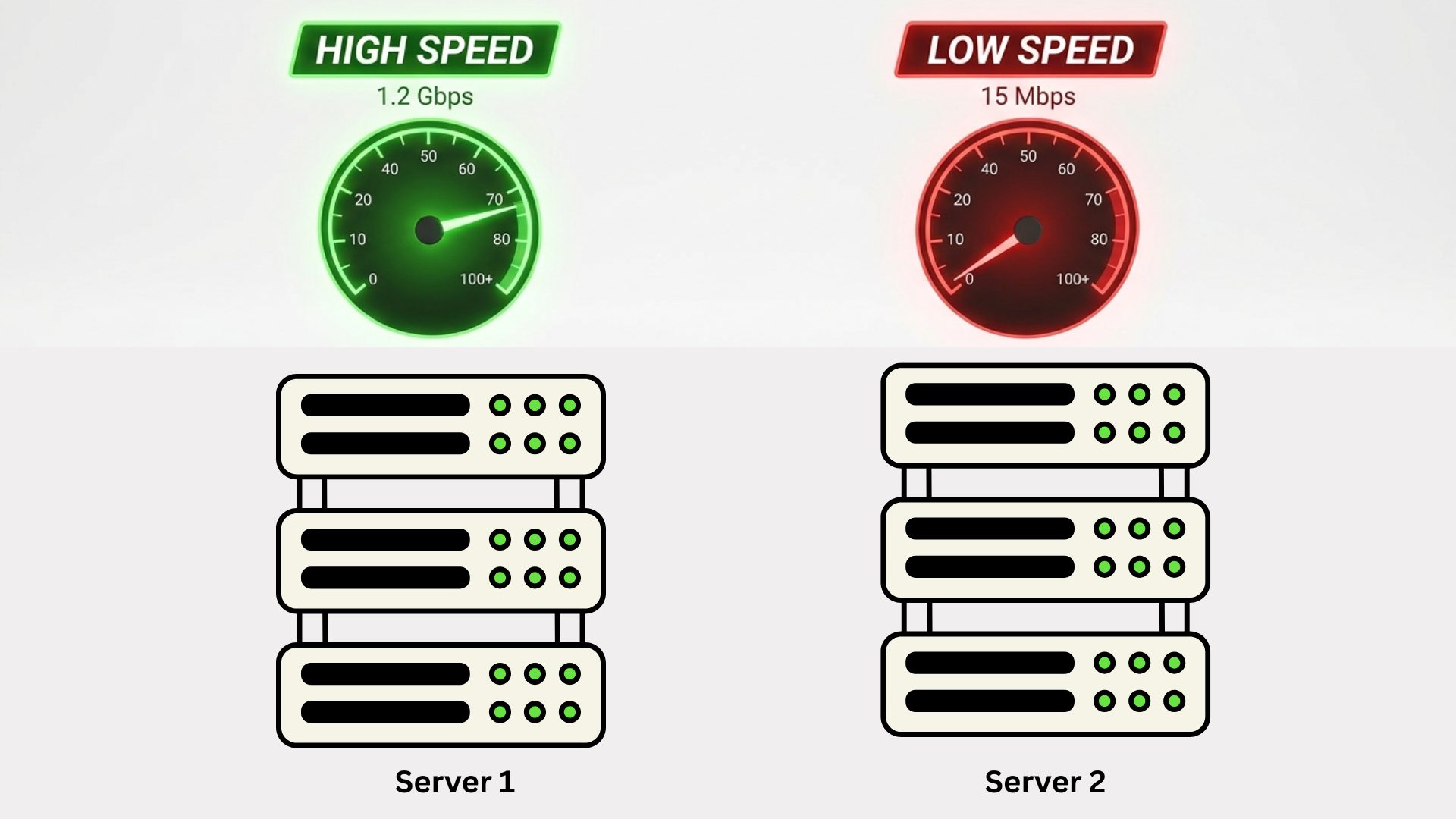
If you have ever launched two cloud instances with identical specifications- same CPU, memory, storage, and operating system, you might expect them to perform exactly the same. In reality, that rarely happens. One instance might boot faster, handle traffic more smoothly, or complete workloads quicker than another, even though both look identical on paper.
This inconsistency often surprises engineers, startups, and DevOps teams. After all, cloud providers advertise standardized virtual machines. So why does performance still vary?
In this article, we’ll explore the real reasons cloud instances behave differently despite having the same specs, and what you can do to minimize unpredictable performance.
1. The Hidden Layer: Virtualization and Shared Hardware
Cloud instances are virtual machines running on physical servers shared with other customers. Even if your instance has dedicated vCPUs assigned, the underlying hardware is still shared.
This introduces what’s known as the “noisy neighbor” problem. If another tenant on the same host is consuming heavy CPU, memory, disk, or network resources, your instance may feel slower, even though your own configuration hasn’t changed.
Hypervisors try to isolate workloads, but perfect isolation is impossible. Disk I/O queues, memory bandwidth, cache contention, and network paths are all affected by nearby workloads.
Result: Two identical instances on different physical hosts may behave very differently.
2. CPU Scheduling and Steal Time
When your cloud provider gives you vCPUs, they are scheduled on physical CPU cores. If many virtual machines compete for those cores, the hypervisor decides who runs and when.
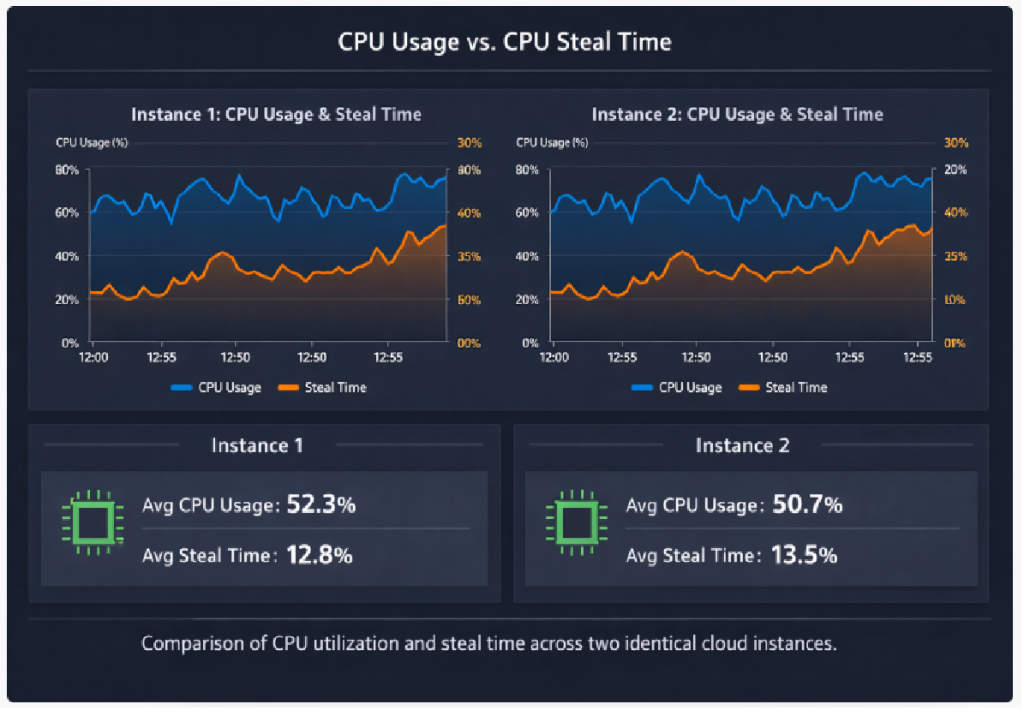
Sometimes your instance experiences CPU steal time, periods when your VM wants CPU but the hypervisor delays it because something else is running.
Even with the same CPU count:
- One instance might get consistent access.
- Another might wait frequently.
This leads to performance gaps, especially for compute-heavy workloads like builds, data processing, or API servers under load.
Result: Identical CPUs, different execution timing.
3. Storage Performance Isn’t Always Equal
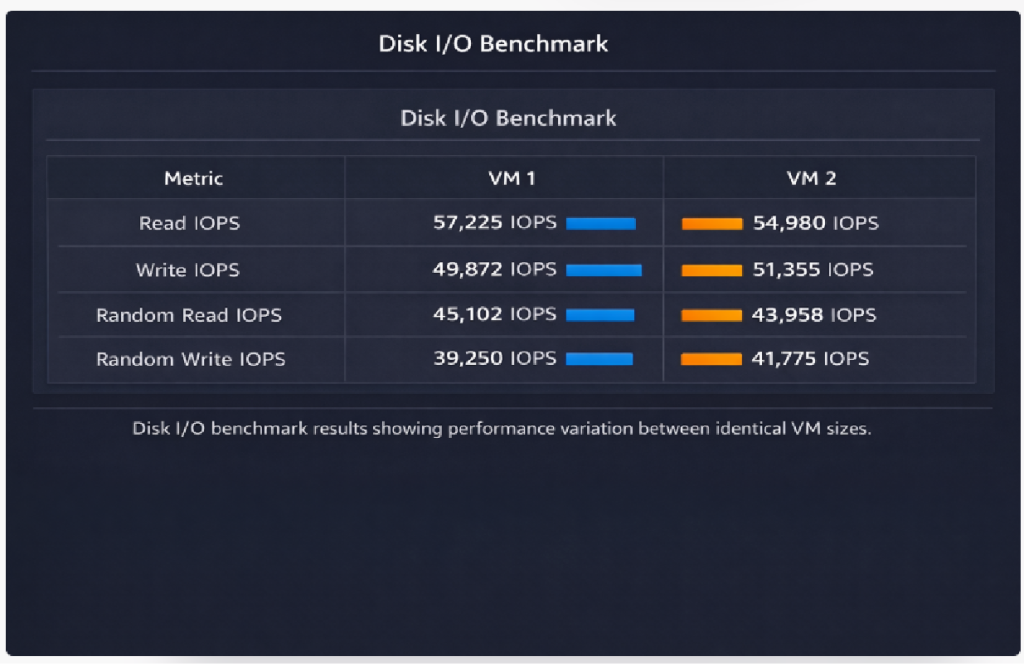
Most cloud disks are network-attached, not physically inside your VM. Even if two instances use the same disk type (e.g., SSD, GP3, Premium Disk), their actual performance can vary.
Reasons include:
- Shared storage backends
- Network congestion
- Disk burst limits
- Placement on different storage clusters
Some volumes can burst temporarily, while others are already throttled.
You might notice:
- Slower database queries
- Inconsistent file writes
- Longer boot times
Result: Storage becomes a major hidden variable.
4. Network Path Differences
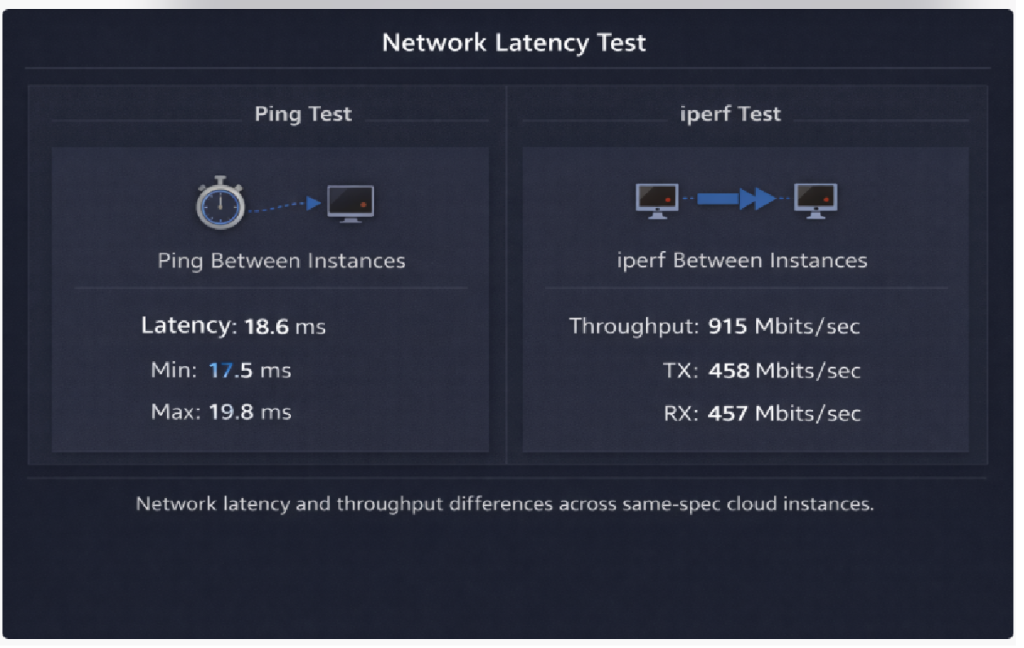
Cloud networking is complex. Traffic travels through multiple virtual switches, routers, and physical links before reaching the internet or another service.
Two instances in the same region may still have:
- Variation in routing routes
- Different network switch points
- Varying levels of network congestion
This affects:
- Latency
- Packet loss
- Throughput
If your workload depends heavily on APIs, microservices, or external connections, network behavior alone can cause major performance differences.
Result: Same NIC specs, different real-world networking behavior.
5. Instance Placement and Hardware Generation
Cloud providers continuously upgrade hardware. Some hosts use newer CPUs, faster memory, and better I/O controllers than others.
Even when specs look the same, your instance may land on:
- Newer Intel/AMD processors
- Older hardware
- Different cache sizes
- Different NUMA layouts
For example, one VM may run on a modern CPU with better turbo boosting, while another uses an older generation.
Unless you request a specific instance family or hardware type, placement can vary.
Result: Same size, different physical machines underneath.
6. Background Maintenance and Live Migration
Cloud platforms constantly perform:
- Security patching
- Hardware upgrades
- Load balancing
- Live migrations
Your instance might be quietly moved from one host to another while running. During migration, brief performance changes can occur.
One VM may have recently migrated, another not. One may be freshly started, another long-running.
This affects:
- Cache warmth
- Disk access patterns
- Network sessions
Result: Runtime history influences performance.
7. Resource Bursting and Throttling
Many cloud resources allow temporary bursting:
- CPU credits
- IOPS burst
- Network burst
If one instance still has credits and another has exhausted them, performance differs dramatically.
For example:
- Instance A still bursts CPU to 100%
- Instance B is throttled to baseline
Yet both appear identical in configuration.
Result: Hidden limits cause unequal behavior.
8. Software and OS-Level Differences
Even if you use the same base image, runtime differences can creep in:
- Different kernel versions
- Background services
- Package updates
- Memory fragmentation
- Cached files
Over time, two machines drift apart. Also, application warm-up, JVM tuning, buffer caching, and filesystem states all affect speed.
Result: The OS and runtime environment matters as much as hardware.
9. Benchmarking Isn’t Always Fair
Many teams compare instances using quick benchmarks. But benchmarks themselves are sensitive to:
- Time of day
- Network traffic
- Cache state
- Parallel workloads
Running a test once doesn’t guarantee accuracy. One instance might be tested under load, another when idle.
Result: Measurement noise looks like a performance difference.
10. How to Reduce Performance Variability
While you can’t eliminate all differences, you can reduce them:
- Use dedicated or isolated instances when possible
- Pin workloads to specific instance families
- Monitor CPU steal time and disk latency
- Use provisioned IOPS instead of burst disks
- Warm up applications before testing
- Run benchmarks multiple times
- Avoid over-subscribed regions
- Use autoscaling instead of assuming identical machines
Consistency comes from design, not just specs.
Final Thoughts
Cloud instances may look identical in configuration, but their real performance is shaped by shared infrastructure, hardware placement, virtualization, storage backends, networking paths, and runtime behavior. Specs tell only part of the story.
Understanding these hidden layers helps engineers design systems that tolerate variability instead of assuming uniformity. In the cloud, performance consistency isn’t guaranteed, it’s engineered.
If you treat the cloud like physical servers, you’ll chase ghosts. But if you treat it like a dynamic, shared ecosystem, you’ll build faster, stronger, and more reliable systems.
Frequently Asked Questions (FAQs)
1. Why do cloud instances with the same specifications perform differently?
Cloud instances run on shared physical infrastructure. Even if the virtual machine specifications are identical, factors like shared hardware usage, virtualization layers, network paths, and storage performance can cause variations in real-world performance.
2. What is the “noisy neighbor” problem in cloud computing?
The noisy neighbor problem occurs when another tenant on the same physical server consumes a large amount of resources such as CPU, memory, disk I/O, or network bandwidth. This heavy usage can indirectly impact the performance of other virtual machines on the same host.
3. What is CPU steal time and how does it affect performance?
CPU steal time refers to the time a virtual machine waits for CPU resources because the hypervisor is serving other VMs. High CPU steal time means your instance is not getting enough CPU cycles, which can slow down applications and workloads.
4. Does storage type affect cloud instance performance?
Yes. Many cloud providers use network-attached storage, and performance can vary due to factors like storage cluster load, IOPS limits, network congestion, and burst limits. Even disks with the same type or size may perform differently.
5. Can network latency vary between instances in the same region?
Yes. Cloud networking involves multiple layers such as virtual switches, routers, and physical links. Differences in routing paths, congestion levels, or switch hops can affect latency and throughput between instances.
6. Does the underlying hardware affect cloud instance performance?
Yes. Cloud providers often run instances on different generations of hardware. Two instances with the same specifications might run on different CPU models, memory speeds, or storage controllers, which can lead to performance differences.
7. What are burstable resources in cloud environments?
Burstable resources allow instances to temporarily exceed their baseline performance using accumulated credits (for CPU, IOPS, or network). Once these credits are exhausted, the instance may be throttled to its baseline performance level.
8. How can I reduce performance variability in cloud instances?
To reduce variability, you can:
- Use dedicated or isolated instances
- Choose provisioned IOPS storage
- Monitor CPU steal time and disk latency
- Run benchmarks multiple times
- Implement autoscaling for workload distribution
9. Are benchmarks reliable for comparing cloud instances?
Benchmarks can provide insights but may not always be reliable if run only once. Performance results can vary depending on time of day, background workloads, and cache states, so multiple test runs are recommended.
10. Is performance variability normal in cloud environments?
Yes. Cloud platforms are dynamic and multi-tenant environments, so some level of performance variation is expected. Designing systems that tolerate variability is a key principle of modern cloud architecture.
Experiencing unexpected performance differences between your cloud instances?
Our cloud experts can help you analyze workloads, optimize configurations, and improve infrastructure reliability.
Partner with SupportPRO for 24/7 proactive cloud support that keeps your business secure, scalable, and ahead of the curve.


