

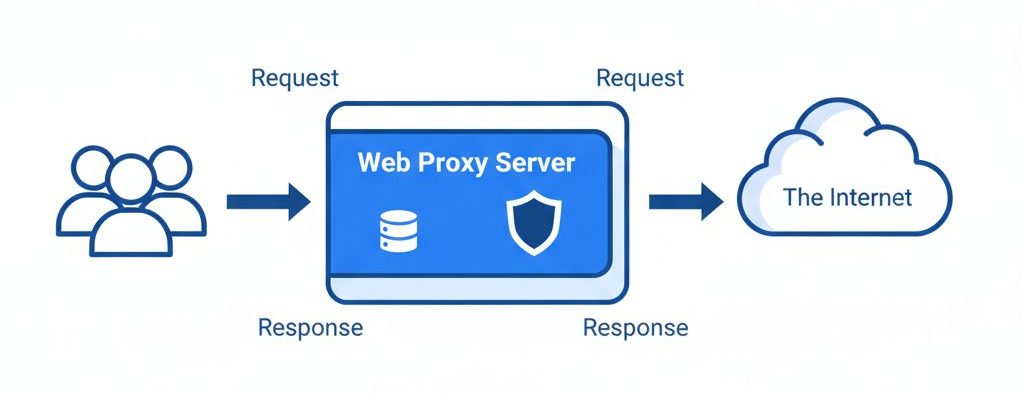
A proxy server is an intermediary application that sits between clients and servers. Instead of connecting directly to a website or service, a client sends requests to the proxy, which then forwards them to the destination server.
Proxies are commonly used to:
- Control user access
- Monitor and log activities
- Improve performance through caching
- Filter content
- Convert between different network protocols
There are proxies for many protocols, including:
- SMTP (Email)
- DNS
- HTTP (Web)
- IRC / IM (Chat)
This article focuses on web proxies, particularly using Squid.
Understanding Web Objects and Caching
What Are Web Objects?
When discussing web proxies and caching, we often refer to objects.
A web object can be:
- An HTML page
- A JPEG image
- A PDF document
- A Flash animation
- A CSS or JavaScript file
Each object is identified by a URL (Uniform Resource Locator).
Note: A “web page” typically consists of multiple objects — the HTML file plus images, scripts, and stylesheets.
How Caching Works
Requests and Responses
Here’s what happens in a typical HTTP transaction:
- A browser sends an HTTP request.
- The origin server sends back an HTTP response (the object).
- The proxy may cache the response for future reuse.
However, not all responses are cacheable.
Factors Affecting Cacheability
Caching depends on:
- Request headers
- Response headers
- Authentication requirements
- Cache-Control directives
- TTL (Time-To-Live)
For example:
- Authenticated content is usually not cacheable.
- Servers may define TTL values for freshness control.
Fresh vs Stale Content
A cached object can be:
Fresh
The object is within its defined TTL and can be served immediately.
Stale
The TTL has expired. The proxy must validate the object using a conditional request before serving it.
This validation ensures users receive updated content when necessary.
Squid Proxy Server
Introduction to Squid
Squid is a free, open-source proxy server primarily designed for UNIX systems, though it can also run on Windows.
Squid:
- Speaks HTTP to browsers
- Is not an email proxy
- Is not an IRC/IM proxy
- Acts partially as an FTP proxy
It is widely used for:
- Web caching
- Access control
- Bandwidth optimization
- Logging and monitoring
Installing Squid on Ubuntu
The easiest way to install Squid is via your OS package manager.
Install via APT:
sudo apt-get install squidAlternatively, install from source:
tar xzvf squid-version.tar.gz
cd squid-version
./configure
make
make install
Understanding squid.conf
The main configuration file is located at:
/etc/squid/squid.confTo view only active (non-commented) lines:
grep -v ^# squid.conf | grep . | lessImportant Configuration Directives
Port Configuration
http_port 3128Default listening port.
Cache Directory
cache_dir ufs /var/spool/squid 1000 16 256Defines storage location and size.
Memory Cache
cache_mem 8 MB
Specifies memory allocated for caching.
Effective User
cache_effective_user proxyRuns Squid under a secure system user.
Example ACL Rule
acl QUERY urlpath_regex cgi-bin \?
no_cache deny QUERY
Prevents caching of dynamic CGI requests.
Starting and Managing Squid
Start / Stop / Restart
/etc/init.d/squid start
/etc/init.d/squid stop
/etc/init.d/squid restart
/etc/init.d/squid reload
Start at Boot
Enable:
sudo update-rc.d squid defaultsDisable:
sudo update-rc.d -f squid removeSquid Log Files
Squid maintains several important logs:
cache.log
/var/log/squid/cache.logRuntime status, warnings, and errors.
access.log
/var/log/squid/access.logClient requests, URLs, transfer size, status codes.
store.log
/var/log/squid/store.logTracks cached objects.
To monitor logs live:
tail -f /var/log/squid/cache.log
tail -f /var/log/squid/access.log
Squid Access Control Lists (ACLs)
Why ACLs Are Critical
An improperly configured proxy becomes an open proxy, which can be abused for:
- Illegal downloads
- Fraudulent transactions
- Spam and malicious activities
All misuse will be traced back to your server’s IP address.
Proper ACL configuration is essential for security.
Understanding ACL Syntax
ACLs define conditions that are later referenced in access rules.
General ACL Format:
acl aclname acltype valueExample:
acl allowed_clients src 192.168.1.0/255.255.255.0This defines trusted local clients.
HTTP Access Rules
After defining ACLs, you use them in http_access rules.
General Format:
http_access allow|deny [!]aclnameExample:
http_access allow allowed_clientsOr:
http_access deny !allowed_clientsThis ensures only trusted clients can use your proxy.
Best Practices for Secure Squid Configuration
- Never allow unrestricted public access
- Restrict proxy usage to internal IP ranges
- Monitor logs regularly
- Keep Squid updated
- Limit cache size based on server resources
- Use strong ACL rules
Conclusion
Web proxies play a critical role in:
- Improving web performance
- Reducing bandwidth usage
- Enhancing access control
- Strengthening network security
Squid remains one of the most powerful and widely used open-source proxy servers. With proper configuration — especially ACL rules — you can build a secure, efficient, and high-performance proxy environment.
If you require help, contact SupportPRO Server Admin
Partner with SupportPRO for 24/7 proactive cloud support that keeps your business secure, scalable, and ahead of the curve.


