

HP CVE-2026-109618 and CVE-2026-109619 are critical remote code execution vulnerabilities disclosed on October 21, 2026. Both vulnerabilities could allow attackers to execute code on affected PHP servers without authentication. PHP has released patched versions, so hosting providers should identify vulnerable installations and apply the appropriate updates promptly.
Updating WordPress, plugins, and themes alone does not protect a website from vulnerabilities in the underlying PHP runtime. If a server still runs a vulnerable PHP version, the website may remain at risk even when its applications are fully updated.
For web hosting companies, fixing these vulnerabilities requires more than updating a single server. One server may run multiple PHP versions, several PHP-FPM pools, and hundreds of customer websites. Hosting environments may also include containers and custom application setups, making it harder to identify every affected installation.
Even one missing vulnerable PHP installation can leave part of the hosting infrastructure exposed.
To build a repeatable response process for newly reported vulnerabilities, read our article on how to assess whether a newly published CVE affects your servers.
This article explains CVE-2026-109618 and CVE-2026-109619, identifies the PHP versions with upstream fixes, and outlines how hosting teams can identify affected installations, apply patches, and verify that their updates resolve the issue.
What Are CVE-2026-109618 and CVE-2026-109619?
PHP disclosed two critical vulnerabilities that can lead to remote code execution (RCE). Remote code execution means an attacker can run code remotely on a vulnerable application or server.
Both vulnerabilities received a CVSS v4.0 score of 9.2, indicating critical risk. The PHP announcement identifies installations handling web requests as affected, including PHP-FPM, Apache with mod_php, php-cgi, FrankenPHP, and LiteSpeed.
CVE-2026-109618: Remote Code Execution Through Memory Corruption
This vulnerability involves how PHP handles out-of-memory (OOM) errors.
When PHP encounters an out-of-memory condition, it may interrupt the current execution context before it initializes all internal request data. During request cleanup, PHP may then treat invalid or uninitialized data as valid.
This can lead to memory corruption and remote code execution.
For hosting providers, this matters because an affected PHP installation may process requests from public websites. An attacker doesn’t need a valid hosting account to exploit a vulnerable request-handling path.
CVE-2026-109619: Remote Code Execution Through Stale Internal State
The second vulnerability occurs when PHP retains references to internal state after freeing the memory that supports it. A later request handled by the same PHP worker may access these outdated references before PHP properly initializes the relevant state. Under affected conditions, an attacker could exploit this flaw to execute code remotely.
For hosting providers, this makes PHP updates and worker restarts especially important. Long-running PHP workers may keep handling requests after an update unless the hosting team restarts the affected processes. In shared hosting environments, teams should verify that every affected PHP installation has received the correct patch and that the relevant workers have restarted successfully.
Which PHP versions are affected?
The PHP team fixed four branches. Make sure you run at least these versions:
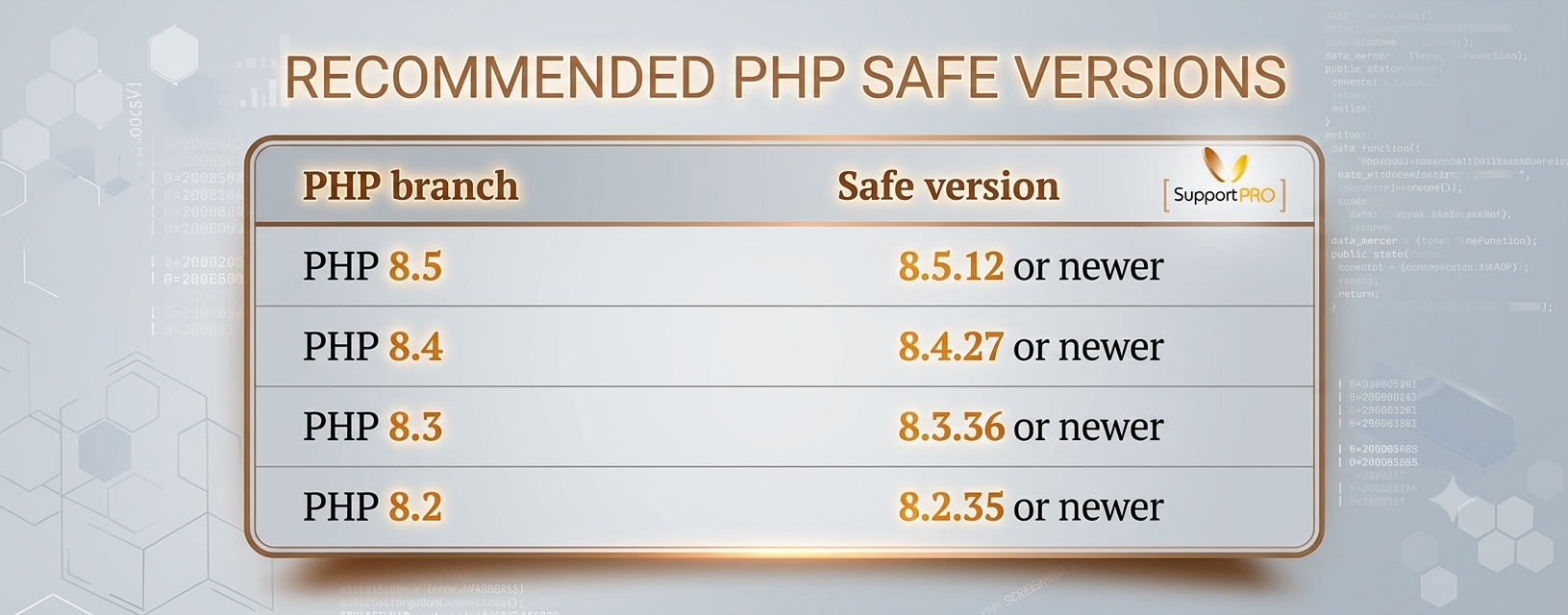
Anything older than these is at risk.
What about PHP 8.1 and below? The PHP team no longer supports those branches, so they got no official fix. Your control panel or OS vendor may have added the fix on their own, which is called a “backport.” For example, cPanel has published backported fixes for PHP 7.4, 8.0 and 8.1, and CloudLinux is patching its PHP Selector versions. PHP below 7.4 on a plain cPanel server may get no fix at all.
Don’t trust the version number alone. A server may show PHP 8.1.x and still be patched, because the vendor fixed it behind the scenes. Check the package changelog to be sure (we show how below).
Do this for every PHP version on the server, including old sites nobody has touched in years.
How to Patch CVE-2026-109618 and CVE-2026-109619
Updating PHP across a hosting environment requires more than running a single command. The following steps help hosting teams identify affected installations, apply the correct patches, and verify the results.
1. Inventory Every PHP Installation
Start by identifying the PHP versions installed across production servers, development systems, containers, and other environments that handle web requests.
On Linux, run: php -v
On RPM-based systems, run:
rpm -qa | grep -E ‘^(php|ea-php)’
For a broader inventory, check:
- All installed PHP branches and package versions.
- PHP-FPM pools and their configured runtimes.
- Apache and LiteSpeed PHP handlers.
- cPanel EasyApache PHP packages.
- Plesk and CloudLinux PHP installations.
- Containers and application-specific PHP builds.
- Scheduled scripts and command-line applications using separate PHP binaries.
If you manage hundreds of customer websites, maintain an inventory that connects each domain to its PHP version, server, package source, and patch status.
This makes it easier to identify installations that still need attention. For additional help troubleshooting PHP-FPM configurations, read our article on how to check whether a website is reaching the PHP-FPM pm.max_children limit.
2. Install the security update
Use the update method for your platform.
On cPanel/WHM, follow the official cPanel security advisory. On RPM-based cPanel servers, run:
yum clean all && yum makecache
/scripts/rpmup
Then restart Apache and PHP-FPM to apply the new build. Updating a package does not always replace the PHP that is already running.
To confirm the fix, check the changelog:
rpm -q –changelog ea-php83-php-cli | grep -m1 CVE-2026-109618
Swap ea-php83 for the package you want to check. Pair this with a version check.
On Plesk, CloudLinux, or another distro, use that vendor’s patch guide. Don’t copy the cPanel steps. Also remember that updating one PHP branch doesn’t touch the others, so you must patch each one.
3. Test your websites and Core Features
A patched server is only half the job. Make sure your sites still work. Test logins, checkout carts, APIs and file uploads. Watch your PHP-FPM and web server logs for errors. Don’t check the homepage and stop there.
Also confirm in your control panel that each domain uses the right PHP version. CLI jobs and containers sometimes use their own PHP, so check those too.
4. Look for signs of an attack
If your server was exposed before you patched it, updating doesn’t prove you’re clean. Read your web and PHP logs for strange requests, repeated crashes or odd errors. Look for new files you don’t recognize and scheduled tasks you didn’t create.
If something looks wrong, save the logs and follow your incident response plan. An update can’t undo a break-in that has already happened.
5. Document Everything
Keep a short record of what you fixed, which packages and versions you installed, what you couldn’t patch, and what your tests showed. It helps you spot gaps, and it makes it easy to explain your work to clients and teammates.
Common questions about PHP vulnerabilities
1. Does updating WordPress also update PHP?
No. WordPress, its plugins and its themes update separately from the PHP on your server. You can run the newest WordPress and still run a risky PHP version. Update PHP itself, then check that the site uses the new version.
2. Can different sites on one server use different PHP versions?
Yes, and it’s common. Some sites need an older PHP to keep working. That’s handy, but patching PHP 8.4 does nothing for PHP 8.2. Patch every version on the server.
3. Is a web application firewall (WAF) enough?
No. A WAF can block some attacks, but it can’t fix a flaw inside PHP itself. Attackers also try to slip past WAF rules. If you truly can’t patch yet, tighten access and watch your logs closely. But none of that replaces the update.
4. What if I use an unsupported PHP version?
Running an unsupported PHP branch is a gamble. Your OS vendor or a third-party support company may offer a backported fix, so check that your package really includes it. If no fix exists, plan to move to a supported version soon. You may need to test your site first, but an unpatched public server costs far more.
5. How can I tell if my hosting provider fixed this?
Ask them:
- Was my PHP version at risk?
- Did you install the patch, and which version?
- Did you test everything afterward?
- Are any old PHP branches still unpatched?
A good host can answer all four clearly.
How SupportPRO Helps Hosting Teams Manage PHP Vulnerabilities
For a hosting company, patching a critical PHP vulnerability involves more than updating a package. Teams must identify every affected runtime, coordinate changes across customer environments, test applications, and verify that no vulnerable installations remain.
SupportPRO provides server administration services, monitoring, maintenance, and technical support for web hosting companies and businesses. Depending on your environment and support requirements, the team can help manage PHP installations, coordinate updates, verify changes, and maintain your hosting infrastructure.
Our services can help hosting teams manage environments using cPanel, Plesk, CloudLinux, and Linux-based infrastructure. Depending on the environment and agreed scope, support can include PHP version inventory, update coordination, post-update checks, and ongoing server maintenance.
If your team needs help managing PHP updates across multiple hosting servers, learn more about SupportPRO’s server administration services.
Timely patching, accurate verification, and consistent maintenance help hosting providers reduce avoidable exposure while keeping customer websites running reliably.
Facing issues?
Our technical support
engineers can solve it.


