• Free Checkup
  • Emergency Support
  • Login
  • Sign Up
Server Management Tips
  • Cloud Support
    • Cloud Management
    • AWS support
    • Google Cloud support
    • Azure Support
    • DevOps Support
  • Server Administration
    • Node Management
    • Dedicated Server Support
  • OutSourced Tech Support
    • Dedicated Support
    • Dedicated Tech Support
    • Semi-Dedicated Tech Support
    • Dedicated Team Support
  • Client Support
    • Helpdesk Support
    • Live Chat Support
  • Emergency Support
    • Hourly Administration
    • Server Migration
    • Server Abuse Handling
  • Development
    • Hire a Developer
    • Hire a Development Team
Server Management Tips
  • Cloud Support
    • Cloud Management
    • AWS support
    • Google Cloud support
    • Azure Support
    • DevOps Support
  • Server Administration
    • Node Management
    • Dedicated Server Support
  • OutSourced Tech Support
    • Dedicated Support
    • Dedicated Tech Support
    • Semi-Dedicated Tech Support
    • Dedicated Team Support
  • Client Support
    • Helpdesk Support
    • Live Chat Support
  • Emergency Support
    • Hourly Administration
    • Server Migration
    • Server Abuse Handling
  • Development
    • Hire a Developer
    • Hire a Development Team
Copyright 2021 - All Right Reserved
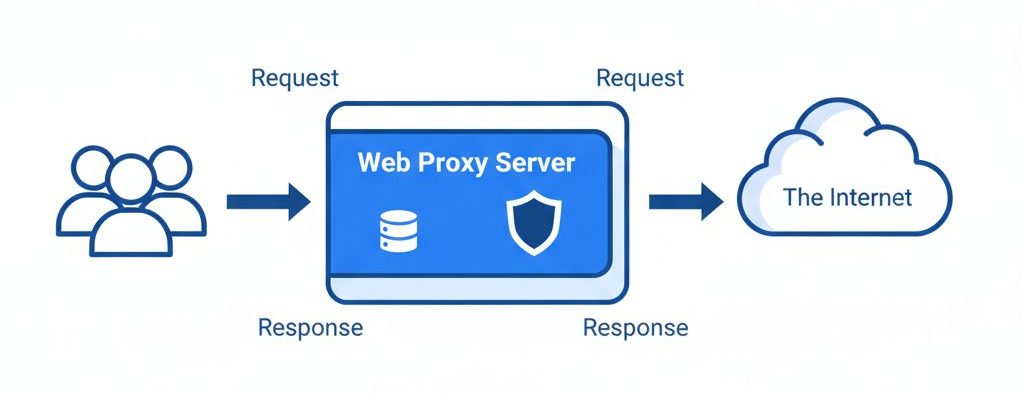
A web proxy server positioned between users and the internet cloud, with arrows indicating request and response flow
Technical Articles

Squid

by SupportPRO Admin April 27, 2008
written by SupportPRO Admin

A proxy server is an intermediary application that sits between clients and servers. Instead of connecting directly to a website or service, a client sends requests to the proxy, which then forwards them to the destination server. Proxies are commonly used to: There are proxies for many protocols, including: This article focuses on web proxies, particularly using Squid. Understanding Web Objects and Caching What Are Web Objects? When discussing web proxies and caching, we often refer to objects. A web object can be: Each object is identified by a URL (Uniform Resource Locator). Note: A “web page” typically consists of multiple objects — the HTML file plus images, scripts, and stylesheets. How Caching Works Requests and Responses Here’s what happens …

Continue Reading
April 27, 2008 0 comments
0 FacebookTwitterPinterestEmail
What is Alternative PHP Cache
Technical Articles

What is Alternative PHP Cache (APC)? Why It Was Replaced by OPcache and APCu

by SupportPRO Admin April 22, 2008
written by SupportPRO Admin

Performance optimization is an important part of managing PHP applications and web servers. In earlier PHP environments, Alternative PHP Cache (APC) was one of the most widely used caching solutions for improving application speed and reducing server load. APC worked by storing compiled PHP bytecode in shared memory, eliminating the need to recompile PHP scripts on every request. This significantly improved performance for dynamic PHP applications. However, APC is now deprecated and unsupported in modern PHP environments. Today, OPcache and APCu are the recommended alternatives for PHP caching and performance optimization. In this blog, we’ll explain what APC was, how it worked, why it became obsolete, and which modern caching solutions should be used instead. What Is Alternative PHP Cache …

Continue Reading
April 22, 2008 0 comments
0 FacebookTwitterPinterestEmail
Technical Articles

DHCP

by SupportPRO Admin November 22, 2007
written by SupportPRO Admin

DHCP (Dynamic Host Control Configuration Protocol) Dynamic Host Configuration Protocol (DHCP) is a network protocol that enables a DHCP server to automatically assign an IP address to an individual computers TCP/IP stack software. DHCP assigns a number dynamically from a defined range of numbers configured for a given network.

Continue Reading
November 22, 2007 0 comments
0 FacebookTwitterPinterestEmail
Virtual Private Server
Technical Articles

VPS : Virtual Private Server

by SupportPRO Admin November 22, 2007
written by SupportPRO Admin

What is a Virtual Private Server? A Virtual Private Server (VPS) is a virtualized environment that runs its own operating system within a physical server. While multiple users share the same hardware resources like CPU and RAM, these resources are allocated in a way that ensures consistent performance—similar to a dedicated server. Each user receives a defined portion of resources, meaning your allocated capacity remains available to you at all times. As a result, every VPS functions independently and behaves like a dedicated server. For example, a physical server with 2GB RAM, 100GB storage, and dual 2GHz processors may host 10 VPS instances. In such a setup, each VPS could be allocated 200MB RAM, 10GB disk space, and an equivalent …

Continue Reading
November 22, 2007 0 comments
0 FacebookTwitterPinterestEmail
Technical Articles

OSI Layer

by SupportPRO Admin November 22, 2007
written by SupportPRO Admin

IMPORTANCE OF OSI LAYERS IN NETWORKING Network A network is an interconnection of 2 or more devices in order to communicate with each other. OSI (Open Systems Interconnection) -To divide complicated process of networking into different layers. -To allow different vendors networks to interoperate. -Developing protocols and devices for different layers. -OSI reference model was introduced by international organization for standardization (ISO). -It allows various types of network hardware and software to communicate.

Continue Reading
November 22, 2007 0 comments
0 FacebookTwitterPinterestEmail
Technical Articles

Future of Web Hosting: Trends, SaaS, and Clustered Infrastructure

by SupportPRO Admin November 21, 2007
written by SupportPRO Admin

Introduction As technology continues to evolve rapidly, the future of web hosting is expected to transform significantly. Advancements in hardware capabilities – including powerful processors, massive RAM capacity, and high-performance storage : are reshaping how hosting environments operate. With increasing computing power, traditional problems such as server downtime, congestion, and performance limitations are gradually becoming less common. Modern innovations, including multi-core processing and distributed infrastructure, are already paving the way toward a more reliable hosting ecosystem. The Rise of SaaS in Web Hosting One of the biggest drivers shaping the future of hosting is Software as a Service (SaaS). SaaS allows applications to be delivered over the internet instead of being installed locally. Hosting providers are rapidly adopting this model …

Continue Reading
November 21, 2007 0 comments
0 FacebookTwitterPinterestEmail
Technical Articles

CACTI

by SupportPRO Admin November 21, 2007
written by SupportPRO Admin

About Cacti Cacti is a PHP/MySQL front end to rrdtool. It handles the storage of all the information required to create and populate rrdtool graphs. Along with being able to maintain Graphs, Data Sources, and RoundRobin Archives in a DataBase, Cacti handles the data gathering also. There is also SNMP support for those used to creating traffic graphs with MRTG. You can use Cacti to gather any sort of data or fetch information from SNMP capable hosts. To manually handle data gathering, you can feed Cacti the Command Line for any external script/command along with any data that the user will need to fill in (IP addresses etc). Cacti will then gather this data in a cron job and populate …

Continue Reading
November 21, 2007 0 comments
0 FacebookTwitterPinterestEmail
Technical Articles

Kerberos Authentication: How It Secures Networks Over the Internet

by SupportPRO Admin November 21, 2007
written by SupportPRO Admin

The Internet is not a secure place by default. Many early network protocols were designed without security in mind and transmit data, including passwords, in plain text. Because of this, tools that capture network traffic and extract sensitive information are commonly used by malicious attackers. Any application that sends unencrypted passwords over the network is therefore highly vulnerable. In addition, many client-server applications trust the client to identify users correctly or limit their own actions. If a client is compromised or modified, this trust can easily be abused, allowing unauthorized access or actions. Some organizations attempt to solve these problems using firewalls. While firewalls are useful, they are not a complete security solution. They often assume that threats come only …

Continue Reading
November 21, 2007 0 comments
0 FacebookTwitterPinterestEmail
Linux Basics

What is SELINUX ?(Security-Enhanced Linux)

by SupportPRO Admin August 31, 2007
written by SupportPRO Admin

SELinux History SELinux was originally a development project from the National Security Agency (NSA), Secure Computing corporation (SCC) and others. It is an implementation of SCC and others. It is an implementation of Flask Operating System security architecture. As a step in its evolution, SELinux was integrated into Linux kernel using the Linux Security Modules (LSM) framework. SELinux motivated the creation of LSM, at the suggestion of Linus Torvalds, who wanted a modular approach to security instead of just accepting SELinux into kernel. SELinux in now a standard component of RHEL and non-commercial distros like Fedora, Debian GNU/Linux, Gentoo Linux etc. Introduction In the world of Linux, SELinux is the new buzzword. Most OS use access controls to limit the …

Continue Reading
August 31, 2007 0 comments
0 FacebookTwitterPinterestEmail
General Topics

Simple Network Management Protocol(SNMP)

by SupportPRO Admin May 30, 2007
written by SupportPRO Admin

The Simple Network Management Protocol (SNMP) is an application layer protocol that facilitates the exchange of management information between network devices. It is part of the Transmission Control Protocol/Internet Protocol (TCP/IP) protocol suite. Two versions of SNMP exist SNMP version 1 (SNMPv1) and SNMP version 2 (SNMPv2). Both versions have a number of features in common, but SNMPv2 offers enhancements, such as additional protocol operations. Components of SNMP An SNMP-managed network consists of three key components: managed devices, agents, and network-management systems (NMSs). A managed device is a network node that contains an SNMP agent and that resides on a managed network. Managed devices to collect and store management information and make this information available to NMSs using SNMP. Managed …

Continue Reading
May 30, 2007 0 comments
0 FacebookTwitterPinterestEmail
Newer Posts
Older Posts

Services

  • Outsourced hosting support
  • Server administration
  • Web Programming
  • Why “Free Memory” Is Low but Linux Isn’t Actually Out of Memory
    If you have ever run free -h on a Linux server and noticed that the free memory value is surprisingly low, your first reaction might be: “Is the server running…
  • Upgrade CentOS, AlmaLinux, and CloudLinux with cPanel ELevate
    Keeping a server operating system up to date is essential for security, compatibility, and long-term stability. For hosting servers running cPanel, however, an operating system upgrade can be more complicated…
  • What Logs Should a Systems Engineer Collect Before Rebooting a Production Server?
    Rebooting a production server may seem like a routine task, especially when troubleshooting performance issues, applying updates, or recovering from a service failure. However, a reboot can erase valuable information…

Categories

  • ansible
  • Artificial Intelligence
  • AWS
  • AWS managed service provider
  • AWS Support
  • aws support services
  • Build Automation
  • Business
  • Case Study
  • Cloud
  • Cloud Managed Service
  • Cloud Support Services
  • Cloudflare
  • Compiling tools
  • cPanel
  • Database
  • dedicated server support
  • Dedicated servers
  • Dedicated tech support
  • DevOps
  • Disaster Recovery
  • Docker
  • GCP
  • General Topics
  • JetBackup
  • Linux
  • Linux Basics
  • live chat
  • live chat support
  • Miscellaneous
  • MySQL
  • Open source
  • OpenClaw
  • Outsourced tech support
  • Recovery & Backup
  • Remote infrastructure Management
  • RunCloud
  • Security
  • Server
  • server checkup
  • server management
  • server Migration
  • Server Monitoring
  • Server Security
  • server support
  • Server Tweaking
  • Technical Articles
  • Troubleshooting
  • VPS
  • web hosting
  • web hosting support
  • Windows Server
  • WordPress

CONTACT US

Sales and Support

Phone: 1-(847) 607-6123
Fax: 1-(847)-620-0626
Sales: sales@supportpro.com
Support: clients@supportpro.com
Skype ID: sales_supportpro

Postal Address

1020 Milwaukee Ave, #245,
Deerfield, IL-60015
USA

  • Industry Solutions
    • Web Hosting Services
    • Service Providers
    • E-Commerce Companies
    • Software Vendors
    • Web Developers
    • ISPs
    • Services
  • About Us
    • Company
    • Technical Blog
    • Careers
    • FAQ
    • Partners
    • Site Map
    • Affiliates
  • Popular Plans
    • Dedicated Team Support
    • Helpdesk Support
    • Hourly Administration
    • Legal
    • Privacy Statement
    • Terms of Use
    • How we work

©2022  SupportPRO.com. All Rights Reserved

X-twitter Facebook Linkedin Rss
Server Management Tips
  • Home