

The Hidden Cost of Slow IT Issue Resolution
Every minute of IT downtime costs money. For mid-sized businesses, even one hour of downtime can cost thousands of dollars in lost productivity, missed transactions, and customer dissatisfaction.
Traditional IT support models especially fully on-site teams often struggle with:
- Delayed response times
- Limited 24/7 availability
- Overloaded internal teams
- Inconsistent ticket prioritization
As digital infrastructure becomes more complex, businesses need faster and more scalable support models. This is where remote IT support delivers measurable impact.
But how exactly does it resolve issues faster? And more importantly, is it right for your organization?
Let’s break it down.
What Is Remote IT Support?
Remote IT support is a service model where IT professionals diagnose, troubleshoot, and resolve technical issues using secure remote access tools without being physically present.
It typically includes:
- 24/7 helpdesk services
- Remote desktop troubleshooting
- Server and network monitoring
- Cloud infrastructure support
- Patch management and updates
- Incident and escalation management
Unlike traditional reactive IT support, remote models are proactive, centralized, and tool-driven.
Why Traditional IT Support Often Slows Down Issue Resolution
Before understanding the benefits, it’s important to examine the bottlenecks in traditional IT setups.
1. Physical Dependency
On-site IT requires physical presence. Travel time alone increases Mean Time to Resolution (MTTR).
2. Limited Coverage Hours
Many internal teams operate only during business hours, leaving after-hours issues unresolved.
3. Reactive Approach
Without real-time monitoring tools, issues are addressed only after users report them.
4. Resource Constraints
Internal IT teams often juggle multiple responsibilities, leading to ticket backlogs.
How Remote IT Support Resolves Issues Faster (Step-by-Step)
Step 1: Real-Time Monitoring and Alerts
Remote IT teams use monitoring tools that detect system failures, performance degradation, or security threats immediately.
Impact: Issues are identified before users are affected.
Example: A failing server disk is detected through predictive monitoring and replaced before causing downtime.
Step 2: Instant Remote Access
Technicians can securely connect to user systems or servers within minutes.
Impact: No travel delay. No scheduling conflicts.
Average response time in remote environments is significantly lower compared to traditional on-site models.
Step 3: Centralized Ticketing and Escalation
Modern remote support environments use ITSM platforms with automated prioritization and routing.
Impact: Critical incidents are escalated immediately to the right specialists.
Step 4: Specialized Expertise On-Demand
Remote teams often include specialists across:
- Cloud platforms
- Networking
- Cybersecurity
- Server infrastructure
Instead of relying on one generalist IT staff member, businesses gain access to multiple experts.
Step 5: Preventive Maintenance
Regular patching, updates, and system optimization reduce recurring incidents.
Impact: Fewer disruptions and lower long-term IT risk.
SaaS Company Scaling Rapidly
A SaaS startup experienced recurring server performance issues during peak hours. After implementing remote IT support:
- 24/7 monitoring reduced downtime
- Performance bottlenecks were proactively addressed
- Customer complaints dropped significantly
Result: Faster issue resolution and improved SLA compliance.
Managed Service Provider (MSP)
An MSP supporting multiple clients centralized its helpdesk operations using a remote IT model.
Results included:
- Reduced ticket backlog
- Faster first-response time
- Improved client retention
Mid-Sized E-Commerce Business
An online retailer faced frequent payment gateway interruptions during high-traffic periods.
With remote support:
- Real-time infrastructure monitoring flagged transaction errors immediately
- Specialists resolved integration issues within minutes
- Revenue loss during outages decreased significantly
Remote IT Support vs Traditional On-Site IT: Comparison Table
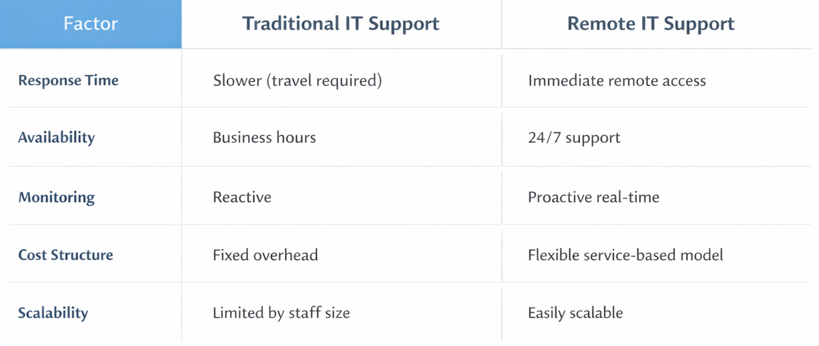
This comparison highlights why many businesses are shifting to remote first support models.
Key Metrics That Improve with Remote IT Support
Decision-makers should evaluate remote IT support using measurable KPIs:
- Mean Time to Resolution (MTTR)
- First Response Time (FRT)
- System Uptime Percentage
- Ticket Backlog Volume
- Customer Satisfaction Score (CSAT)
Organizations that adopt structured remote support models typically see:
- Reduced resolution time
- Improved uptime
- Lower operational costs
Is Remote IT Support Right for Your Business?
- Remote IT support works best for:
- Businesses with distributed teams
- Companies using cloud infrastructure
- Organizations requiring 24/7 system availability
- Growing startups with limited internal IT capacity
- However, industries with strict on-premise compliance requirements may need a hybrid model.
Common Concerns About Remote IT Support
Is it secure?
Yes. Secure remote access tools use encryption, role-based access control, and audit logging.
Will we lose control over our systems?
No. Businesses retain visibility through dashboards, reports, and SLA tracking.
Is it only for large enterprises?
No. Small and mid-sized businesses benefit the most due to cost efficiency and scalability.
How to Choose the Right Remote IT Support Provider
When evaluating providers, look for:
- Clearly defined SLAs
- 24/7 monitoring capabilities
- Proven escalation workflows
- Transparent reporting
- Industry-specific expertise
Ask for case studies and measurable performance outcomes before signing agreements.
Faster Resolution Is a Competitive Advantage
In today’s digital economy, slow IT response times are no longer acceptable. Customers expect reliability. Employees expect seamless systems. Leadership expects operational efficiency.
Remote IT support delivers:
- Faster issue detection
- Immediate troubleshooting
- Proactive prevention
- Scalable expertise
For organizations aiming to reduce downtime, improve system reliability, and optimize IT costs, remote IT support is not just an operational improvement; it is a strategic advantage.
Facing issues?
Our technical support
engineers can solve it.


FAQs
Is remote IT support faster than on-site support?
Yes, because technicians can access systems instantly without travel delays.
What tools are used in remote IT support?
Monitoring platforms, remote desktop software, ticketing systems, and automation tools.
Is remote IT support secure?
Yes. Secure connections use encryption, authentication controls, and activity logs.
When is on-site support still necessary?
Hardware failures, physical installations, or compliance-restricted environments.
How quickly can remote IT resolve issues?
Many incidents are resolved within minutes depending on severity and access level.
