

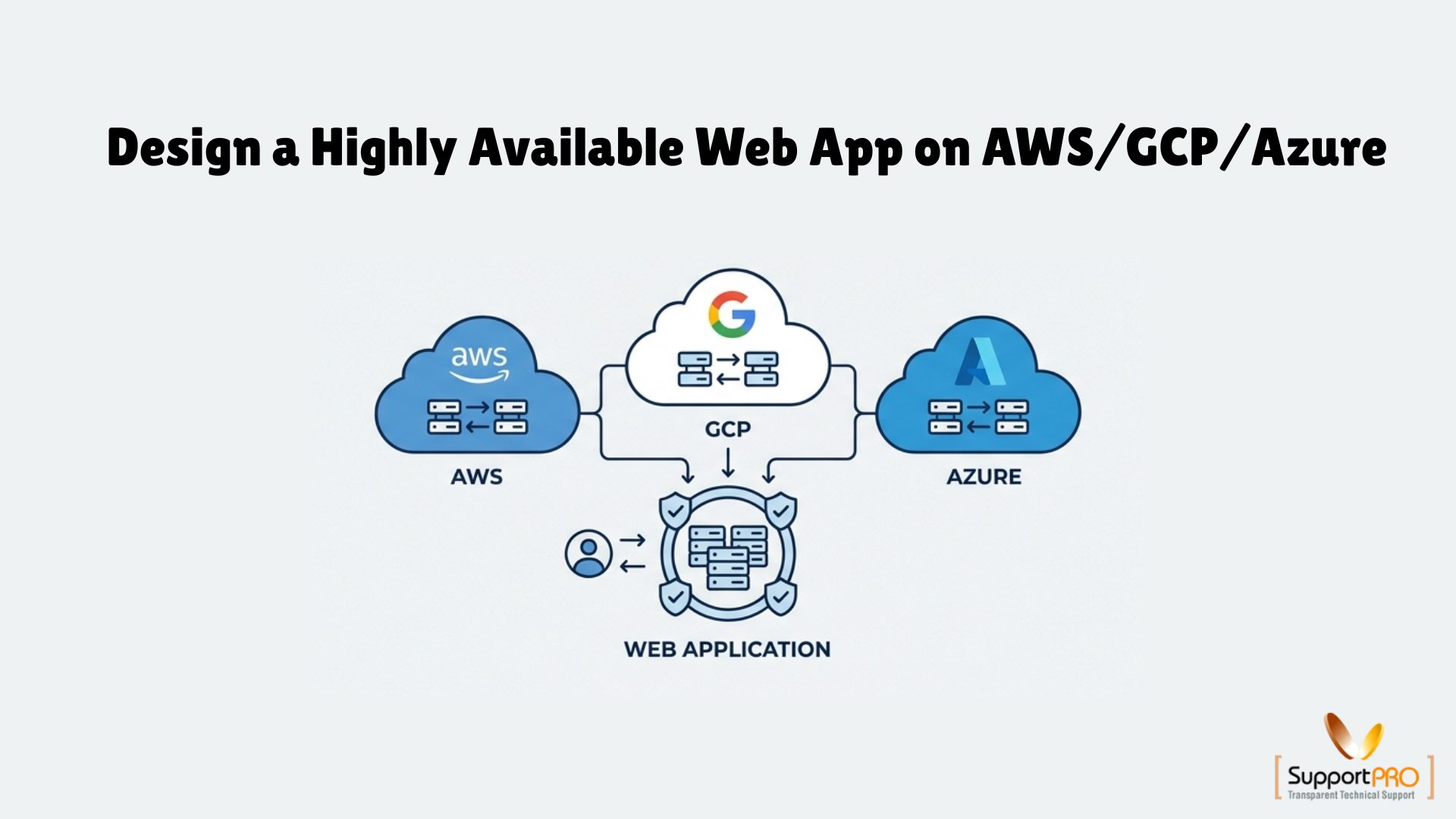
When your application goes down, customers get frustrated, transactions fail, and trust takes a hit. The longer it lasts, the more it costs not just in revenue, but in reputation.
The good news? It’s not inevitable. Modern cloud platforms give you everything you need to build systems that keep running through failures whether that’s a server crash, a network outage, or even a full data center going dark. This is the power of High Availability (HA).
In this guide, we’ll break down how to design, build, and test a resilient web app across AWS, GCP, and Azure so your business stays online when it matters most.
What High Availability Really Means
High Availability is more than just a vague promise of “good uptime.” It’s a deliberate architecture where failure is not only expected but meticulously planned for. A highly available system is like a high-wire performer who always has a safety net and a backup safety net under that so even if one thing breaks, the show goes on without the audience even noticing.
Four core pillars make this possible:
- Redundancy: This is the foundational rule: no single points of failure. Every critical component has a clone, a hot standby ready to take over instantly. If one web server crashes? There are three more ready to pick up the slack. If your primary database catches fire? A perfect replica is already running in another building, ready to be promoted. Redundancy is your insurance policy against the inevitable.
- Monitoring: You can’t fix what you don’t see. Monitoring is the nervous system of your application. It’s a constant stream of health checks and performance metrics that tell you instantly if something’s broken or, even better, if it’s about to break. It’s the difference between finding out about a problem from an angry customer and having an automated alert tell you that a server’s memory usage is creeping into the danger zone.
- Failover: This is the automated magic that makes redundancy useful. Failover is the process of detecting a failure (via monitoring) and automatically switching traffic from the broken component to the healthy, redundant one. This happens in seconds, without a human needing to wake up, log in, and run a script. It’s the self-driving car of reliability, instantly changing lanes the moment it detects an obstacle.
- Failback: Once the crisis is over and the original component is repaired and healthy again, you need a clean way to switch back. Failback is the graceful, controlled process of returning to your normal operating state without causing more downtime or losing data.
The “Unbreakable” Blueprint: A Restaurant Analogy
No matter which cloud you use, the HA architecture pattern is universal. To make it simple, let’s think of your application as a busy restaurant.
- The Front Door (Load Balancer): This is your restaurant’s host. They don’t just seat customers at random tables. They greet everyone, look at the dining room, and guide them to a table with a waiter who is ready and available. If a waiter is on a break or overwhelmed, the host intelligently sends new customers elsewhere.
- The Workforce (Compute Group): These are your waiters. You don’t just have one; you have a whole team. If one waiter gets sick and goes home (a failed instance), the restaurant manager immediately calls in a replacement to take over their section. During the dinner rush (peak traffic), more waiters are brought onto the floor to handle the load.
- The Brains (Replicated Database): This is the kitchen, run by the head chef. The chef (primary database) is responsible for every dish. But right next to them is a sous-chef (replica database) who is mirroring every single move the head chef makes. If the head chef faints from exhaustion, the sous-chef instantly takes over, and the customers never know the difference.
- The Pulse Check (Monitoring & Health Probes): This is the ever-watchful restaurant manager. They are constantly walking the floor, checking that the waiters are taking orders correctly, the kitchen is sending out food, and no part of the operation is failing. If they spot a problem, they orchestrate the fix immediately.
AWS: Designing for Resilience Across Availability Zones
On AWS, the #1 rule is: Never put all your eggs in one Availability Zone (AZ). An AZ is a distinct data center. By building across multiple AZs, you can survive a flood, power outage, or network failure in one data center without your app blinking.
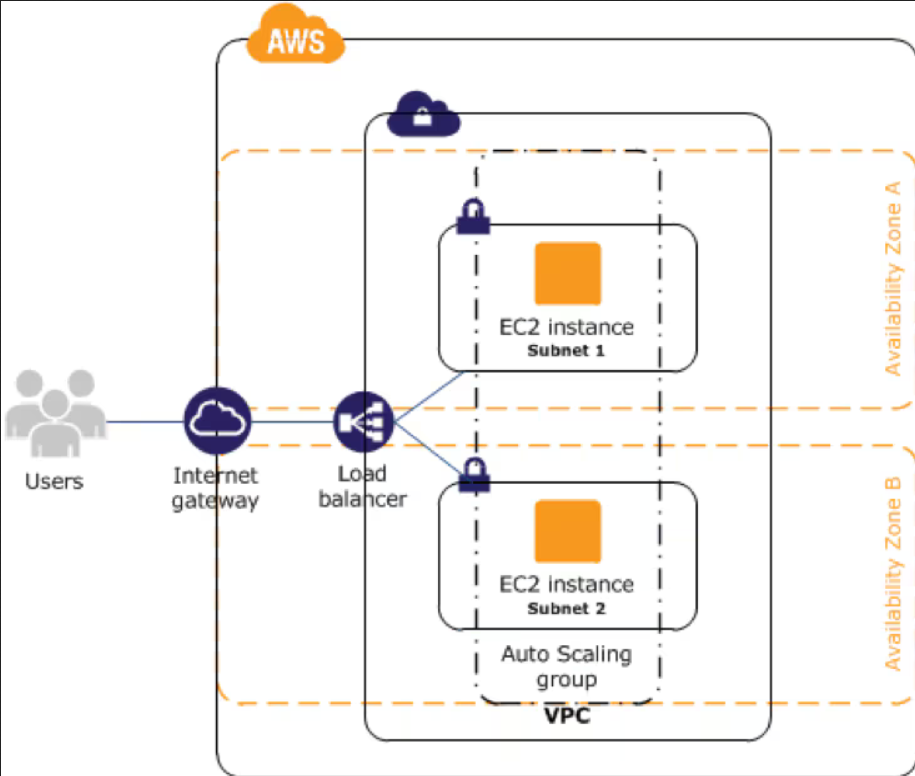
Here’s how an HA request flows in AWS:
- Route 53 (DNS): The journey begins here. Route 53 translates your domain name into an address for the Application Load Balancer. It can even perform its own health checks, allowing you to route traffic away from an entire region if it’s experiencing problems.
- Application Load Balancer (ALB): This is your hyper-intelligent host. The ALB is inherently highly available because it lives across multiple AZs by default. Every few seconds, it sends a health check to each of your servers. If a server fails the check, the ALB instantly stops sending traffic to it.
- Auto Scaling Group (ASG): This is your self-healing workforce. The ASG is configured to spread your EC2 instances across at least two (preferably three) AZs. If one entire AZ goes dark, the instances in the other AZs continue serving traffic. More importantly, when the ALB reports an instance as unhealthy, the ASG springs into action, terminating the failed instance and launching a perfect replacement from a pre-configured launch template.
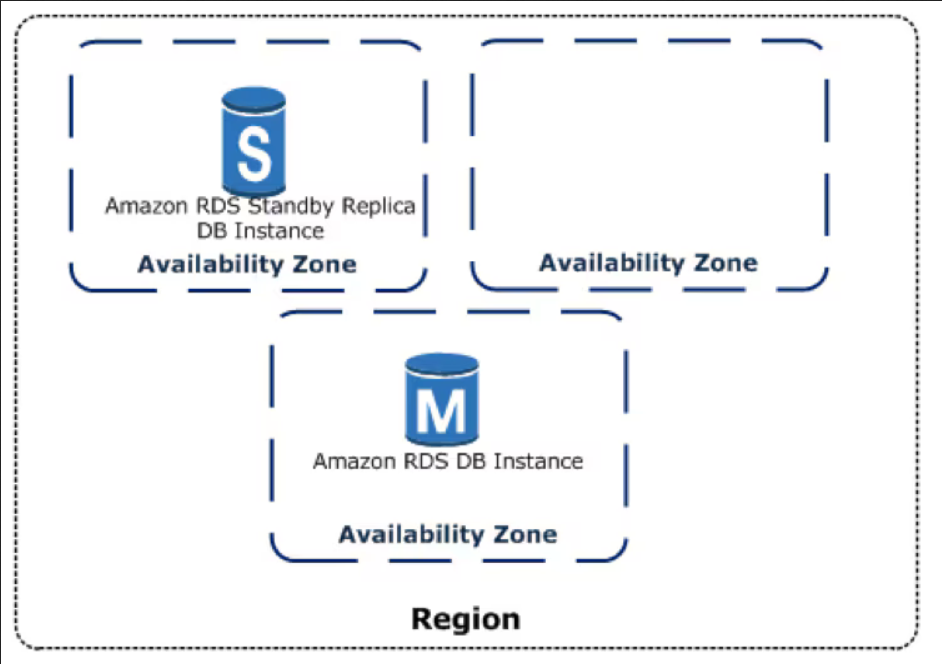
- Amazon RDS with Multi-AZ: This is your bulletproof kitchen. When you enable Multi-AZ, AWS creates a perfect, synchronous standby replica of your database in a different AZ. If the primary database fails, AWS automatically handles the failover re-pointing your application’s connection to the standby, often within 60 seconds and with zero data loss.
- Storage Layer: Services like Amazon S3 and EFS are highly available by default, storing your data redundantly across at least three AZs without you having to do a thing.
GCP: Global Load Balancing and Multi-Zone Healing
Google Cloud approaches HA with a powerful, global-first mindset, leveraging its planet-spanning network.
Here’s how it works:
- Cloud DNS: This resolves your domain name to a single, anycast IP address for the load balancer. This one IP address exists everywhere on Google’s network edge.
- Global External HTTP(S) Load Balancer: This is GCP’s superpower. It’s a truly global service that automatically routes users to the nearest healthy backend in your deployment, anywhere in the world. It can absorb massive traffic spikes without any “pre-warming” and provides a single front door for your entire application.
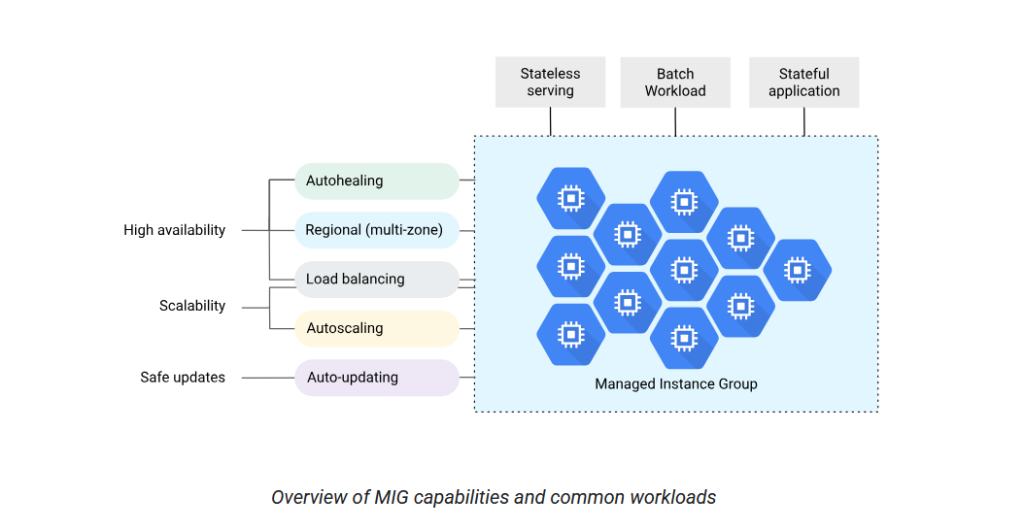
- Managed Instance Group (MIG): Your fleet of VMs is managed by a MIG configured for multi-zone deployment. This tells the MIG to distribute instances across different zones within a region (e.g., us-central1-a and us-central1-b). The MIG’s auto-healing policy is tied directly to the load balancer’s health checks. If an instance fails its check, the MIG kills it and creates a new one.
- Cloud SQL with High Availability: Just like on AWS, enabling HA for Cloud SQL creates a primary instance in one zone and a synchronous standby in another. The replication ensures zero data loss (RPO=0) for most failures, and the failover process is fully automated.
Azure: Enterprise-Grade Zone Redundancy
Azure’s HA model is built on a foundation of enterprise-grade, zone-redundant services designed to work together seamlessly.
Here’s the HA flow:
- Azure DNS: This maps your domain name to the public IP of your Application Gateway or, for global scale, Azure Front Door.
- Application Gateway (Standard_v2): This SKU is critical because the gateway itself is zone-redundant by design, meaning its own infrastructure is spread across multiple AZs. It provides advanced routing, SSL termination, and a built-in Web Application Firewall (WAF), all while running health probes against your backend servers.
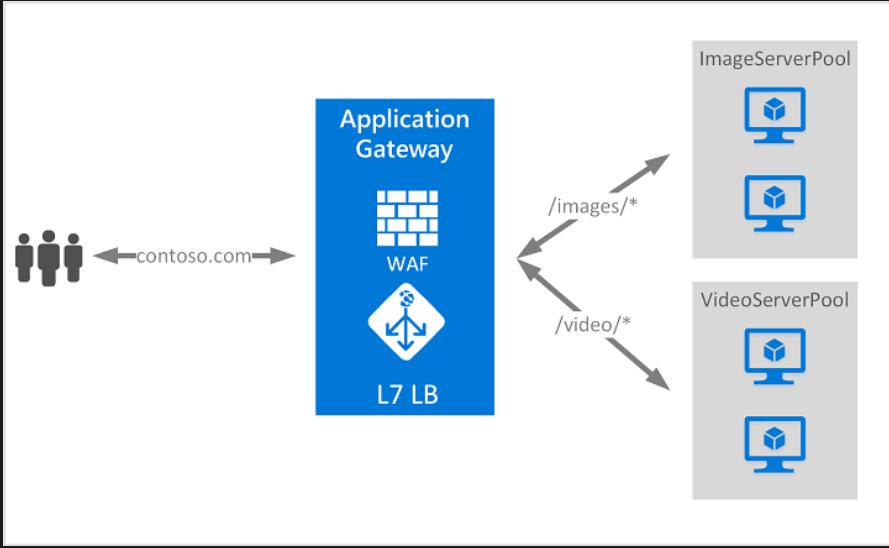
- Virtual Machine Scale Sets (VMSS): The VMSS is configured to distribute your VMs evenly across all three Availability Zones in a region. It integrates directly with the Application Gateway’s health probes. When a probe fails, the gateway stops sending traffic, and the VMSS’s auto-heal policy kicks in to replace the faulty instance.
- Azure SQL Database (Business Critical or Premium tiers): These tiers provide a powerful HA model with multiple synchronous replicas in different zones. This guarantees zero data loss for failures and provides a transparent, automatic failover that requires no changes to your application’s connection string.
Battle-Testing Your HA Design: Break Things on Purpose
An HA design on paper is just a theory. A real, battle-tested HA design is a fact. The only way to know if your safety net works is to jump.
- Go into the AWS console and terminate one of your EC2 instances.
- Find a VM in your Azure VMSS and delete it.
- Stop an instance in your GCP Managed Instance Group.
Did your application stay online without a blip? Did you see the monitoring alerts fire? Did the auto-healing process kick in and create a new instance? If yes, congratulations – you’ve built a resilient system. If not, you just found tomorrow’s highest priority task.
The Real Work Begins Now: From HA to True Resilience
Having a single highly available region is fantastic, but it’s just the start.
- Automate Everything: Use Infrastructure as Code (Terraform, Bicep, CloudFormation) to define your entire HA stack. This makes it repeatable, consistent, and eliminates human error.
- Monitor Aggressively: Don’t just collect metrics; create meaningful alerts. Integrate with PagerDuty, Slack, or Teams so the right people know about a problem instantly.
- Go Multi-Region: High Availability protects you from a zone failure. Disaster Recovery (DR), built by replicating this architecture in a second region, protects you from a region-wide catastrophe.
Because the truth is, the 3 AM panic call will only happen if you let it. By designing for failure, you build systems that deliver success.
Conclusion: High Availability Is a Habit, Not a One-Time Project
Building a highly available web app isn’t something you check off a to-do list, it’s a mindset you bake into every decision, from your first line of code to your production deployments. The clouds AWS, GCP, and Azure give you the tools, but the real difference comes from how you use them: spreading risk, automating recovery, and testing your systems until failure becomes boring.
Downtime will always be a possibility, but it doesn’t have to be a disaster. By embracing redundancy, monitoring relentlessly, and planning for the worst, you’re not just keeping your app online, you’re protecting your business, your customers, and your reputation.
High availability isn’t just about surviving failure. It’s about delivering trust, 24/7, no matter what happens behind the scenes. Build it, test it, and live it so when the unexpected strikes, your users never even notice.
Need Help Building a Highly Available Cloud Environment?
Designing resilient applications across AWS, GCP, or Azure requires the right architecture, monitoring, and failover strategies. Contact SupportPRO today for expert assistance with cloud architecture, reliability, and infrastructure management.
Facing issues?
Our technical support
engineers can solve it.


