

TeamCity is a powerful Continuous Integration (CI) and Continuous Delivery (CD) tool developed by JetBrains. It is written in the Java programming language and helps development teams automate the process of building, testing, and deploying software projects.
TeamCity is widely used by organizations that want to streamline their development workflow and ensure that code changes are continuously tested and integrated. It is a commercial, proprietary tool designed primarily for business environments that require reliable CI/CD automation.
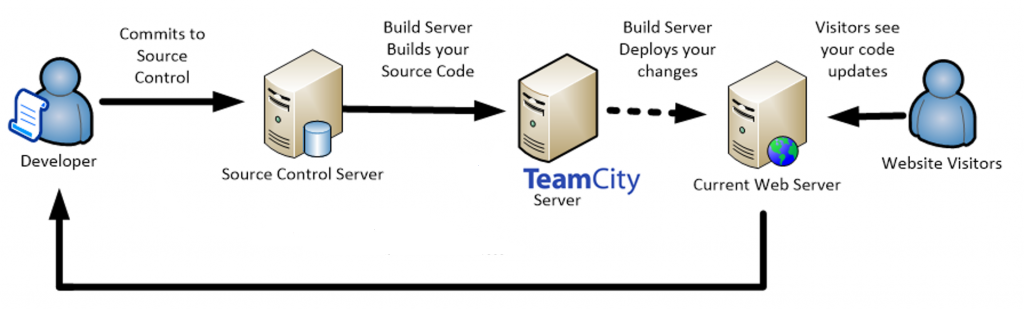
Architecture of TeamCity
TeamCity uses a distributed architecture that consists of two main components: the TeamCity Server and Build Agents. Together, they manage and execute the build process efficiently.
1. TeamCity Server
The TeamCity Server is the central component of the system. It is responsible for managing the overall configuration of projects and controlling the build pipeline.
Key responsibilities of the server include:
- Monitoring build processes
- Managing project configurations
- Controlling build queues
- Tracking build history and results
- Managing connected build agents
The server also provides the web interface where developers can configure projects and monitor builds.
2. Build Agents
Build Agents are the machines that actually execute the build tasks. They perform operations such as compiling code, running tests, and generating build artifacts.
Each agent communicates with the TeamCity Server and receives instructions about which builds to execute. For better performance, organizations usually install build agents on separate machines instead of the same server.
This distributed setup improves scalability and allows multiple builds to run simultaneously.
Key Features of TeamCity
TeamCity provides a wide range of features that help automate development workflows and improve software quality.
Extensibility and Customization
TeamCity allows developers to reuse project configurations. Settings from a parent project can be inherited by subprojects, making configuration management easier.
Improved Code Quality
The tool helps maintain code quality by automatically running builds and tests whenever changes are made. It can also detect stuck or hanging builds and notify the development team.
Stable CI Server
TeamCity keeps the CI server stable even when no builds are currently running. This ensures the system remains reliable and ready for new tasks.
Parallel Builds
Multiple builds can run simultaneously across different environments. This significantly reduces build times and improves development efficiency.
Docker Support
TeamCity supports building Docker images as part of the build process. Developers can include Docker-related steps in their build pipelines.
Flexible Testing with Agents
Build agents can also be used for executing automated tests. This allows testing tasks to be distributed across multiple systems.
Cross-Platform Support
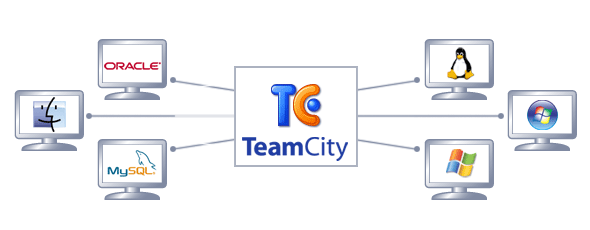
The TeamCity server and build agents can run on different operating systems. For example, the server might run on Linux while the agents run on Windows or macOS.
Testing Changes Before Committing
TeamCity allows developers to test code changes during the build process before committing them to a version control system (VCS). This helps prevent unstable code from entering the repository.
Important TeamCity Terminology
Understanding the basic terminology used in TeamCity helps developers work with the platform more effectively.
Build Agent
A Build Agent is the component responsible for executing build and test tasks. It acts as the engine that runs the build process.
TeamCity Server
The TeamCity Server is the central environment where all project configurations, build settings, and monitoring activities are managed.
Build Queue
The Build Queue displays a list of active and pending builds waiting to be executed by available agents.
Build Artifacts
Build Artifacts are the final outputs produced by the build process. These files can include formats such as ZIP archives, WAR files, executables, or other compiled packages.
Project
A Project in TeamCity represents a product or application. A project can contain multiple subprojects, build configurations, and related components.
Build Configuration
A Build Configuration is a collection of settings that define how a build should be executed. It includes details such as build steps, triggers, and environment parameters.
Build Step
A Build Step represents a single task within the build process. For example, compiling code, running tests, or packaging the application.
Build Trigger
A Build Trigger defines when a build should start. Builds can be triggered automatically based on events such as code commits, scheduled times, or manual actions.
Drawbacks of TeamCity
Although TeamCity offers many benefits, it also has some limitations.
Upgrade Complexity
Upgrading from one version of TeamCity to another can require significant effort and preparation.
Licensing Limitations
TeamCity is not an open-source tool. The free version supports only 3 build agents and 100 build configurations. Larger teams must purchase a commercial license.
Smaller User Community
Compared to other CI tools such as Jenkins, TeamCity has a relatively smaller user community. This can sometimes make it harder to find community support or resources.
Conclusion
TeamCity is a reliable and feature-rich CI/CD platform that helps development teams automate the process of building, testing, and deploying applications. With its distributed architecture, flexible configuration options, and strong integration capabilities, it provides an efficient solution for modern DevOps workflows.
While the licensing model and upgrade complexity may present challenges for some teams, TeamCity remains a powerful tool for organizations that require a robust and scalable continuous integration system.
Facing issues?
Our technical support
engineers can solve it.


