

Email providers are services that allow users to send receive and store email messages over the internet They offer secure mail servers spam filtering user authentication and access through webmail mobile apps and email clients Popular email providers support protocols like IMAP POP and SMTP to ensure reliable communication across devices. Follow the steps below to create an email account on an Android mobile device. From the Home screen, tap the Apps icon. Open the Email app (or Mail, depending on your device). Tap Add Account or Next. Enter the following details: Email address – Your full email address Password – Your email password Tap Next. Choose the account type: IMAP (recommended) or POP Incoming Server Settings Enter the following …
If you want to disable redirection to SSL connection while accessing WHM, cPanel, Webmail, please follows these steps. Login to WHM >> Tweak Setting >> Uncheck the following options under Redirection. Always redirect users to the ssl/tls ports when visiting /cpanel, /webmail, etc. Also you have to uncheck the following option under Security in Tweak Settings. Require SSL for all remote logins to cPanel, WHM and Webmail. This setting is recommended. Also you can disable those options from the shell. SSH to the server as root. Open /var/cpanel/cpanel.config and set the following options to 0 (zero). alwaysredirecttossl requiressl – alwaysredirecttossl=0 requiressl=0 Save the file and exit. If you require help, contact SupportPRO Server Admin Partner with SupportPRO for 24/7 proactive cloud support …
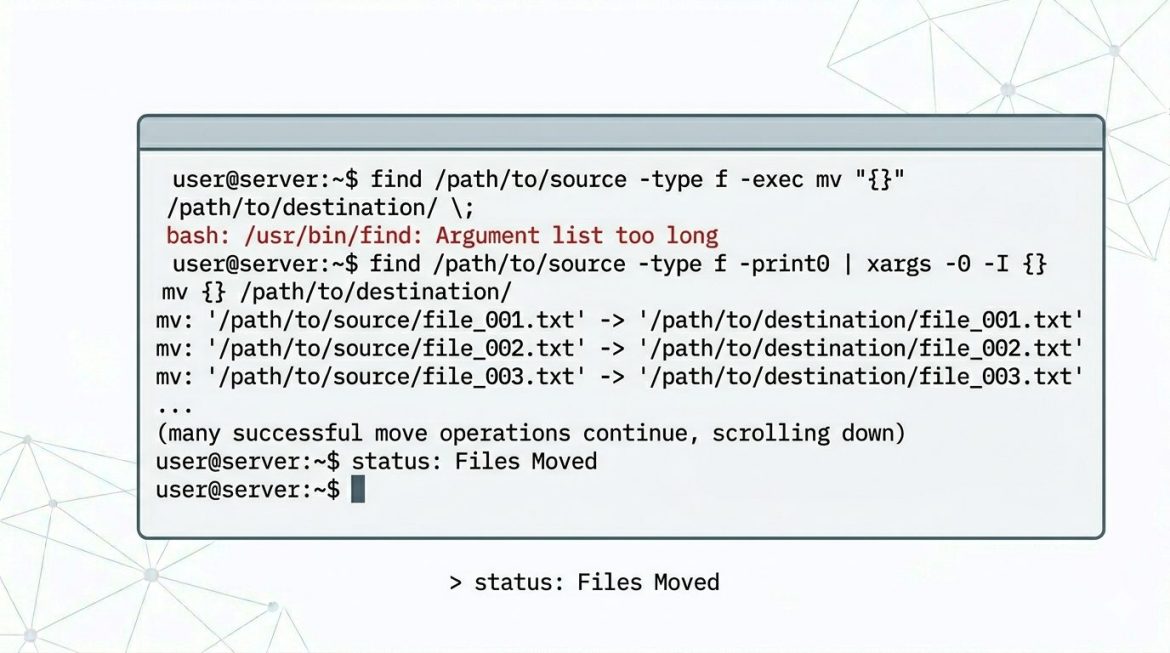
When managing Linux servers, administrators often need to move thousands of files from one directory to another. However, attempting to move a large number of files using the standard mv command may result in an error. This guide explains why the “Argument list too long” error occurs and how to safely move large numbers of files without issues. Why the Error Occurs If you try to move a huge number of files (for example, more than 50,000 files) using: you may see the following error: Reason Linux shells expand * into all filenames before executing the command.When the total character length exceeds the system’s allowed limit, the command fails. This limitation is controlled by the system’s maximum argument length (ARG_MAX). …
If your server are having multiple IP address and you want to send each emails in different IP, then please follow the steps. This is used to maintain the ip reputation. Also, please make sure that this is not used for spamming. 1. vi /etc/exim.conf 2. Search for the line : interface = 3. Replace this line with interface = xxx.xxx.x.1${eval:${substr{-2}{1}{$tod_zulu}}%9+1} 4. If your server is having ip’s from xxx.xxx.x.11 to xxx.xxx.x.20 , you can use above line. +1 is is the starting ip ie xxx.xxx.x.1’1′ and %9 is the increment value ie 11(xxx.xxx.x.11) to how much. Here it is 20 (xxx.xxx.x.20) If you require help, contact SupportPRO Server Admin
PCI DSS (Payment Card Industry Data Security Standards) are the official security standards created by the PCI Security Standard Council to reduce payment card frauds. It provides elaborate and comprehensive standards to enhance payment card data security. The core purpose of PCI DSS this is to create as secure of an environment as possible for users to process their credit cards. To adhere by PCI DSS, service providers and merchants who sell products over the web are required to have a periodic PCI Security Scans that are usually defined by the credit card companies. PCI Security Scans are initiated over the Internet by an Approved Scanning Vendor (ASV). These scans pinpoint the vulnerabilities and misconfiguration of websites, servers, applications and …
Login to the server: telnet localhost “portnumber” netstat command to find open ports ———————————- netstat –listen To display open ports and established TCP connections, enter —————————————————————- netstat -vatn To display only open UDP ports try the following command: ———————————————————— netstat -vaun To display the list of open ports, enter: ——————————————— lsof -i If you require help, contact SupportPRO Server Admin
You can use the command given below to check the hard disk performance. hdparm /dev/sda /dev/sda: IO_support = 0 (default 16-bit) readonly = 0 (off) readahead = 256 (on) geometry = 30401/255/63, sectors = 488397168, start = 0 If you require help, contact SupportPRO Server Admin
Disabling direct root login over SSH is an important security practice for any cPanel server. Allowing remote root access increases the risk of brute-force attacks and unauthorized logins. By disabling root login, administrators must first log in using a normal user account and then switch to root privileges securely. This approach also allows administrators to access WHM/cPanel without the root password, improving security while maintaining full administrative control over the server. This guide explains how to disable root SSH login on a cPanel server safely without locking yourself out. Why Disable Root SSH Login? The root user has complete control over the server. If attackers gain root access, the entire system can be compromised. Security benefits include: Important Step Before …
Marketing and brand promotion have always been critical focus areas for growing businesses. Many companies have grown and flourished on the foundation of effective marketing strategies. Over time, the concept of marketing has evolved significantly, driven largely by advancements in technology. To remain relevant and competitive, businesses must adapt to these changing marketing strategies. One of the most impactful changes in recent years is social media marketing. Businesses of all sizes have embraced it as a low-cost yet highly effective promotional tool capable of driving large volumes of targeted traffic. Social media platforms help spread awareness about products, services, brands, features, updates, and even limitations covering almost every aspect of a business. Why Social Media Matters for Web Hosting Companies …
If you are getting error while accessing the Rvsitebuilder from cpanel ==================== Fatal error: The encoded file /var/cpanel/rvglobalsoft/rvsitebuilder/www/ionctestlicense.php requires a license file. The license file /var/cpanel/rvglobalsoft/rvsitebuilder/rvsitebuilder.lic has expired. in Unknown on line 0 ===================== Then Please login to the server through root and execute. ======== root@server[#]rm -f /var/cpanel/rvglobalsoft/rvsitebuilder/rvsitebuilder.lic root@server[#] rm -f /var/cpanel/rvglobalsoft/rvsitebuilder/rvsitebuilder-pro.lic root@server[#] perl /usr/local/cpanel/whostmgr/docroot/cgi/rvsitebuilderinstaller/autoinstaller.cgi ======== This will fix the issue If you require help, contact SupportPRO Server Admin