• Free Checkup
  • Emergency Support
  • Login
  • Sign Up
Server Management Tips
  • Cloud Support
    • Cloud Management
    • AWS support
    • Google Cloud support
    • Azure Support
    • DevOps Support
  • Server Administration
    • Node Management
    • Dedicated Server Support
  • OutSourced Tech Support
    • Dedicated Support
    • Dedicated Tech Support
    • Semi-Dedicated Tech Support
    • Dedicated Team Support
  • Client Support
    • Helpdesk Support
    • Live Chat Support
  • Emergency Support
    • Hourly Administration
    • Server Migration
    • Server Abuse Handling
  • Development
    • Hire a Developer
    • Hire a Development Team
Server Management Tips
  • Cloud Support
    • Cloud Management
    • AWS support
    • Google Cloud support
    • Azure Support
    • DevOps Support
  • Server Administration
    • Node Management
    • Dedicated Server Support
  • OutSourced Tech Support
    • Dedicated Support
    • Dedicated Tech Support
    • Semi-Dedicated Tech Support
    • Dedicated Team Support
  • Client Support
    • Helpdesk Support
    • Live Chat Support
  • Emergency Support
    • Hourly Administration
    • Server Migration
    • Server Abuse Handling
  • Development
    • Hire a Developer
    • Hire a Development Team
Copyright 2021 - All Right Reserved
restrict number of connections per vhost/dir and limit the bandwidth for files
Server SecurityServer TweakingTechnical Articles

How to restrict number of connections per vhost/dir and limit the bandwidth for files

by SupportPRO Admin March 11, 2011
written by SupportPRO Admin

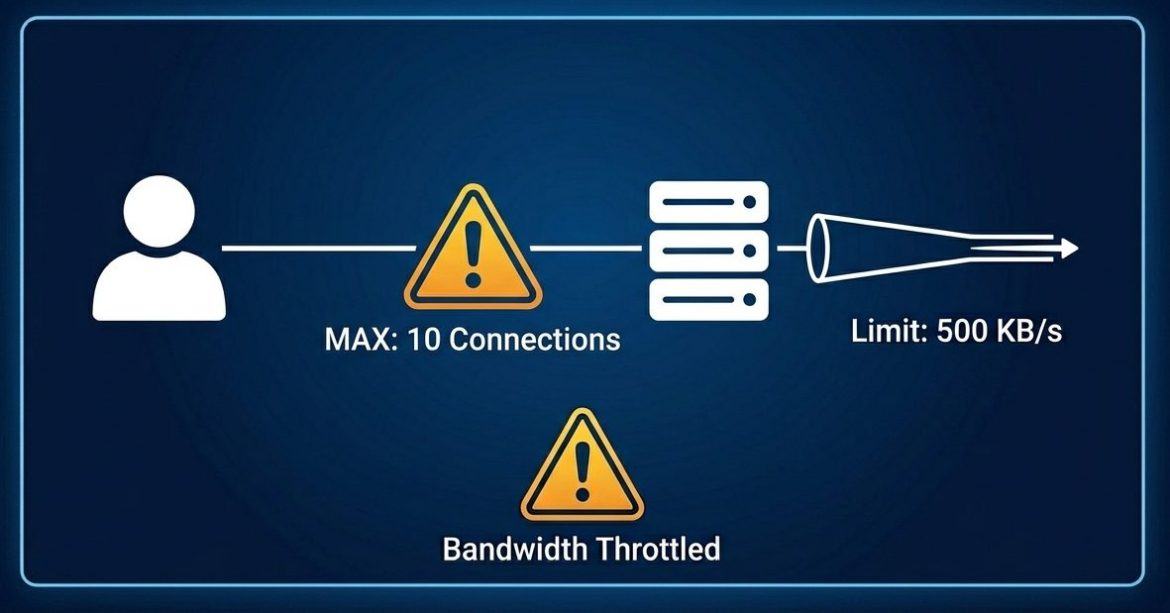
Managing server resources efficiently is essential for maintaining performance and stability. If a particular domain or directory is consuming excessive bandwidth, you can control its usage using the mod_bw module in Apache. The mod_bw (bandwidth module) allows administrators to restrict bandwidth usage and limit the number of simultaneous connections for specific virtual hosts (vhosts) or directories. This is especially useful in shared hosting environments where resource control is critical. When to Use mod_bw You can use mod_bw when: Steps to Install and Configure mod_bw 1. Check Apache Version Run the following command to verify your Apache version: 2. Download the mod_bw Module 3. Extract the Package 4. Review Configuration Instructions 5. Install the Module 6. Create Configuration File 7. Verify …

Continue Reading
March 11, 2011 0 comments
0 FacebookTwitterPinterestEmail
Miscellaneous

How to change ssh private Key

by SupportPRO Admin March 11, 2011
written by SupportPRO Admin

1.Copy the key and save it as .ppk extension [for eg: rsa.ppk] 2.Open puttygen.exe ( This can be downloaded from http://www.putty.org/) 3.Select Load and browse the path to the .ppk file where you have stored. 4.Then Click “Save private key”. It will ask for save and save the file in a locaion in .ppk format. [For eg: C:\MyKeys\key.ppk ] 5.Right-Click Putty and selet Edit and specify the path such asstart c:\putty -ssh root@xxx.xxx.x.x-i C:\MyKeys\key.ppk” If you require help, contact SupportPRO Server Admin

Continue Reading
March 11, 2011 0 comments
0 FacebookTwitterPinterestEmail
Miscellaneous

How To Test The Hard Drive for Problems

by SupportPRO Admin March 11, 2011
written by SupportPRO Admin

It is not often that we need to test the hard drive for problems, but you never know when you may have to. One of the major reasons to perform a test would be if you are seeing read-only errors often (which can normally be fixed by a reboot), the system crashing out too often, or you are seeing very slow read/write times for small amounts of data. This can often be a sign of a failing drive, something a test can point out.

Continue Reading
March 11, 2011 0 comments
0 FacebookTwitterPinterestEmail
Miscellaneous

Greylisting, Blacklisting and Whitelisting

by SupportPRO Admin March 10, 2011
written by SupportPRO Admin

Greylisting Greylisting is a simple way of blocking emails. in Grey listing, what it checks is that if the mail is legitimate or not. If there is a prior relationship between the sender and the receiver, the message get delivered without any issue. If the sender is suspicious and unknown the message gets temporarily rejected with 451 error message.

Continue Reading
March 10, 2011 0 comments
0 FacebookTwitterPinterestEmail
memecached
Miscellaneous

What is Memcached? Working, Benefits and Installation Guide

by SupportPRO Admin March 10, 2011
written by SupportPRO Admin

In today’s web hosting environment, databases play a critical role in powering websites and applications. Many modern platforms depend heavily on databases such as MySQL to store and retrieve large amounts of data. However, when websites receive heavy traffic, database queries can increase significantly, which may slow down performance. To handle high traffic and reduce downtime, many large websites use database clustering and caching solutions. One of the most popular tools used for this purpose is Memcached, a distributed memory caching system designed to improve the speed and scalability of dynamic web applications. Memcached was originally developed by Brad Fitzpatrick to help manage database load more efficiently. Today, it is widely used by high-traffic websites to reduce database queries and …

Continue Reading
March 10, 2011 0 comments
0 FacebookTwitterPinterestEmail
Miscellaneous

How to Set Up SSH Key Authentication Between Two Linux Servers

by SupportPRO Admin March 3, 2011
written by SupportPRO Admin

If you manage multiple Linux servers, logging in with a password every time can be slow and insecure. A better method is to configure SSH key-based authentication. This allows secure login without entering a password each time. In this guide, we will configure SSH access between two servers: Step 1: Login to Server1 as Root First, log in to Server1 using SSH. Step 2: Generate an SSH Key Pair on Server1 Instead of using DSA (which is outdated), it is recommended to use RSA or ED25519 for better security. Run the following command on Server1: You will see: Press Enter to accept the default location. You may: After completion, you will see: Your identification has been saved in /root/.ssh/id_rsa Your …

Continue Reading
March 3, 2011 0 comments
0 FacebookTwitterPinterestEmail
Miscellaneous

How to upgrade WordPress

by SupportPRO Admin March 3, 2011
written by SupportPRO Admin

You can update your WP easily by the following steps : 1. Backup your database. 2. Backup ALL your WordPress files in your WordPress directory. Don’t forget your .htaccess file. 3. Verify the backups you created are there and usable. 4. Deactivate ALL your Plugins. 5. Ensure first four steps are completed. 6. Download and extract the WordPress package fromhttp://wordpress.org/download/. 7. Delete the old WordPress files on your site, but DO NOT DELETE the following files * wp-config.php file; * wp-content folder; Special Exception: the wp-content/cache and the wp-content/plugins/widgets folders should be deleted. * wp-images folder; * wp-includes/languages/ folder–if you are using a language file do not delete that folder; * .htaccess file–if you have added custom rules to your …

Continue Reading
March 3, 2011 0 comments
0 FacebookTwitterPinterestEmail
Miscellaneous

Linux Plesk Back end files

by SupportPRO Admin March 3, 2011
written by SupportPRO Admin

Plesk root directory : /usr/local/psa Plesk version : /usr/local/psa/version Plesk Admin pass : /etc/psa/.psa.shadow Plesk conf file : /etc/psa/psa.conf Apache conf : /etc/httpd/conf/httpd.conf Plesk apache startup script : /usr/local/psa/admin/bin/httpsdctl start Apachelog files : /var/log/http/ Php conf : /etc/php.ini Named conf : /var/named/run-root/etc/named.conf Named db : /var/named/run-root/var/domainname Log : /var/log/messages Names restart : /etc/init.d/named restart Mysql Db location : /var/lib/mysql Mysql conf : /etc/my.cnf Mysql log : /var/log/mysql.log Plesk qmail : /var/qmail Mail Dir for domain: /var/qmail/mailnames/domainname Maillog : /var/log/maillog Plesk home dir : /var/www/vhosts/domain.com Plesk Doc root : /var/www/vhost/domainname/httpdocs Subdomain Docroot: /var/www/vhost/domainname/subdomain Domain specific log: /var/www/vhosts/domainname/statistics/logs If you require help, contact SupportPRO Server Admin

Continue Reading
March 3, 2011 0 comments
0 FacebookTwitterPinterestEmail
Miscellaneous

How to Bring Back Deleted Files Using “lsof” Command ?

by SupportPRO Admin March 3, 2011
written by SupportPRO Admin

Accidentally deleting a file in Linux does not always mean the data is permanently lost. Thanks to how the Linux filesystem works, it is often possible to recover a deleted file — provided a running process still has it open. This guide explains how Linux handles file deletion and how you can recover deleted files using the /proc filesystem and the lsof command. Understanding How Linux Deletes Files In Linux, a file is essentially a link to an inode. An inode stores important metadata such as: When you delete a file using the rm command, Linux removes only the directory entry (link) pointing to the inode. The actual data is not immediately deleted. The data remains on disk as long …

Continue Reading
March 3, 2011 0 comments
0 FacebookTwitterPinterestEmail
How SSL Works
Security

How does SSL works? | Simple Explanation of Secure Website Connections

by SupportPRO Admin February 22, 2011
written by SupportPRO Admin

In today’s digital world, online security is more important than ever. Whenever you log in to a website, make a payment, or submit personal information, your data travels across the internet. Without protection, hackers could intercept this information. This is where SSL comes in. SSL, or Secure Sockets Layer, is a security protocol that encrypts communication between a user’s browser and a website server. It ensures that sensitive information such as passwords, credit card details, and personal data remains secure during transmission. In this blog, we will explain how SSL works in a simple step-by-step manner. What is SSL? SSL stands for Secure Sockets Layer. It is a standard security technology used to create an encrypted connection between a web …

Continue Reading
February 22, 2011 0 comments
0 FacebookTwitterPinterestEmail
Newer Posts
Older Posts

Services

  • Outsourced hosting support
  • Server administration
  • Web Programming
  • Why “Free Memory” Is Low but Linux Isn’t Actually Out of Memory
    If you have ever run free -h on a Linux server and noticed that the free memory value is surprisingly low, your first reaction might be: “Is the server running…
  • Upgrade CentOS, AlmaLinux, and CloudLinux with cPanel ELevate
    Keeping a server operating system up to date is essential for security, compatibility, and long-term stability. For hosting servers running cPanel, however, an operating system upgrade can be more complicated…
  • What Logs Should a Systems Engineer Collect Before Rebooting a Production Server?
    Rebooting a production server may seem like a routine task, especially when troubleshooting performance issues, applying updates, or recovering from a service failure. However, a reboot can erase valuable information…

Categories

  • ansible
  • Artificial Intelligence
  • AWS
  • AWS managed service provider
  • AWS Support
  • aws support services
  • Build Automation
  • Business
  • Case Study
  • Cloud
  • Cloud Managed Service
  • Cloud Support Services
  • Cloudflare
  • Compiling tools
  • cPanel
  • Database
  • dedicated server support
  • Dedicated servers
  • Dedicated tech support
  • DevOps
  • Disaster Recovery
  • Docker
  • GCP
  • General Topics
  • JetBackup
  • Linux
  • Linux Basics
  • live chat
  • live chat support
  • Miscellaneous
  • MySQL
  • Open source
  • OpenClaw
  • Outsourced tech support
  • Recovery & Backup
  • Remote infrastructure Management
  • RunCloud
  • Security
  • Server
  • server checkup
  • server management
  • server Migration
  • Server Monitoring
  • Server Security
  • server support
  • Server Tweaking
  • Technical Articles
  • Troubleshooting
  • VPS
  • web hosting
  • web hosting support
  • Windows Server
  • WordPress

CONTACT US

Sales and Support

Phone: 1-(847) 607-6123
Fax: 1-(847)-620-0626
Sales: sales@supportpro.com
Support: clients@supportpro.com
Skype ID: sales_supportpro

Postal Address

1020 Milwaukee Ave, #245,
Deerfield, IL-60015
USA

  • Industry Solutions
    • Web Hosting Services
    • Service Providers
    • E-Commerce Companies
    • Software Vendors
    • Web Developers
    • ISPs
    • Services
  • About Us
    • Company
    • Technical Blog
    • Careers
    • FAQ
    • Partners
    • Site Map
    • Affiliates
  • Popular Plans
    • Dedicated Team Support
    • Helpdesk Support
    • Hourly Administration
    • Legal
    • Privacy Statement
    • Terms of Use
    • How we work

©2022  SupportPRO.com. All Rights Reserved

X-twitter Facebook Linkedin Rss
Server Management Tips
  • Home