

Picture a new apartment building. Before anyone moves in, an inspector checks every lock and window. That’s image scanning. It tells you what could go wrong.. But what if someone is already jiggling a door handle at 2 a.m.? That’s where Kubernetes runtime security comes in. It’s the smoke alarm: it spots trouble while it’s happening. On 16 October 2026, Google announced a preview of the Wiz Runtime Sensor as a managed add-on for Google Kubernetes Engine (GKE). It covers both Standard and Autopilot clusters. The big idea: GKE installs and updates the sensor for you, instead of a Helm release you babysit across dozens of clusters.
If you run Kubernetes for a SaaS product or manage clusters for clients, here is what to settle before you switch it on.
So, What Does the Add-on Actually Do?
Think of it as a security guard that Google hires and manages for you. GKE installs the sensor, hands it the credentials, and rolls out new versions on its own schedule. Your cluster and node upgrades don’t have to wait for it.
The sensor uses eBPF, a Linux kernel feature that lets small, safe programs watch what’s going on inside the system (a good explainer is here). That kernel-level view is why you’ll hear it called eBPF runtime security, or eBPF Kubernetes security when it runs on clusters. It watches system calls, processes, network connections and file access. This is runtime threat detection for Kubernetes at work, looking for:It watches system calls, processes, network connections, and file access. It’s looking for:
- Reverse shells (an attacker getting remote control of a container)
- Privilege escalation
- Container escapes
- Risky outbound connections
It sends anything it finds to the Wiz platform.
What does it cost? The documentation makes two points:
- GKE charges nothing for the add-on, but you still need an active Wiz Runtime Sensor license.
- If you keep credentials in Secret Manager (Google’s password vault), its normal pricing applies.
Your readiness checklist: tick these off first
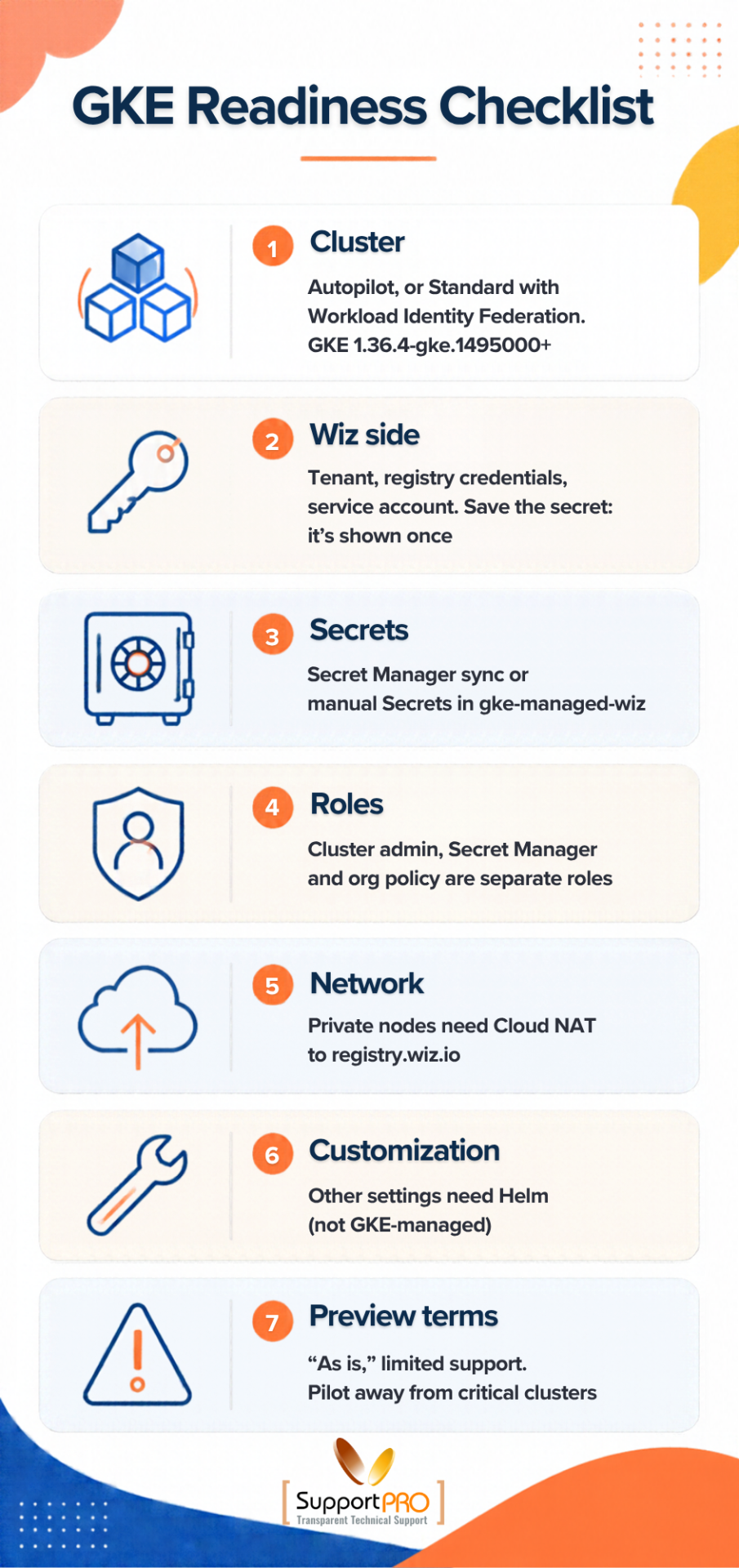
Treat this like a pre-flight check.
- Cluster: Use Autopilot, or Standard with Workload Identity Federation for GKE turned on. That feature lets your workloads prove who they are without stored keys. You also need GKE 1.36.4-gke.1495000 or later.
- Wiz side: You need a Wiz tenant, registry credentials for the Wiz container registry, and a Wiz service account. The client secret is shown only once, so copy it and store it safely right away.
- Secrets: Sync them from Secret Manager, or create Kubernetes Secrets by hand in the
gke-managed-wiznamespace. - Roles: Cluster admin, Secret Manager and organization policy permissions are separate roles. Decide who holds each one before the pilot starts.
- Network: Private nodes need Cloud NAT (outbound-only internet access) to reach
registry.wiz.io. If you use a proxy, the add-on accepts only the HTTPS proxy URL plus the CA and client certificates. - Customization: Any other sensor setting needs the Helm chart. Helm installs aren’t managed by GKE, so those issues go to Wiz.
- Preview terms: Pre-GA features come “as is,” sometimes with limited support. Start away from your revenue-critical clusters.
How do you know it’s working?
Check that the gke-managed-wiz namespace exists. Then check that the wiz-sensor DaemonSet is ready (a DaemonSet runs one copy of a program on every node), and read its logs.
Google’s install guide even includes a test deployment that fakes a reverse shell. If everything works, a finding shows up on the Wiz Threats page. Run that test in a non-production cluster only.
Plot twist: Google’s own sources don’t agree
The launch post and the documentation were written for different audiences, and a couple of details don’t match. Test both before you trust either.
1. Credential rotation
The launch post says an updated key in Secret Manager reaches the sensor without restarts. The documentation says updating Secrets does not automatically restart the DaemonSet. You have to run kubectl rollout restart yourself. Wiz’s own announcement repeats the no-restart claim.
What to do: Rehearse a rotation in staging, and write your runbook for the stricter version.
2. Organization policy
The post’s sample rule uses an ALLOW action and a condition under wizSensorConfig. The documentation uses a DENY action on resource.addonsConfig.wizSensor.enabled == false. The field path and the action differ.
What to do: Try the rule in a sandbox folder first. A wrong constraint can block legitimate cluster changes across your whole organization.
Will it slow things down? Measure, don’t guess
None of the sources we reviewed publish CPU or memory numbers. The launch post says the sensor keeps CPU low and uses a fixed memory limit per node. The documentation says the components use node resources and may mean you need more nodes. Both can be true, so check on your own workloads:
- Read the DaemonSet’s requests and limits:
kubectl get ds wiz-sensor -n gke-managed-wiz -o yaml - Baseline node usage and pod density on a pilot node pool, then compare after enabling.
- Test small-node pools separately. A per-node agent takes a bigger bite out of a small node.
- Test at peak traffic, especially for latency-sensitive services and bursty AI workloads.
- Additionally, watch how the extra requests show up in your cost reports over a full billing cycle.
Who Gets the 2 A.M. Alert?
Enabling detection is the easy part. The real challenge is deciding who responds when an alert triggers. Define ownership and response procedures in advance to ensure every alert reaches the right team without delay.
- Assign a team to triage alerts. Designate an on-call owner to review findings in the Wiz portal. This responsibility may belong to the security team, platform team, or an MSP security team.
- Assign remediation ownership. Map namespaces and workloads to the appropriate teams so that responders can quickly route alerts, such as reverse-shell detections, to the owners who can resolve them.
- Define escalation criteria. Establish severity levels and response time expectations to determine which alerts require immediate human intervention. Clear guidelines prevent confusion and eliminate unnecessary escalations.
- Control automated response actions. Authorize specific teams to configure automated blocking or threat-stopping rules. Evaluate these controls carefully because terminating processes in production environments can introduce service disruptions.
- Establish MSP access and reporting responsibilities. Maintain separate Wiz service accounts and Secret Manager projects for each client. Define a clear process for communicating findings and remediation updates to the appropriate stakeholders.
Try it safely: a six-step pilot
- Pick a non-production cluster that mirrors production traffic.
- Prepare your Wiz credentials and store them in Secret Manager.
- Enable the add-on and run the reverse-shell test.
- Measure overhead for at least a week.
- Push a sample alert through your real incident process.
- Only then think about an organization-wide policy.
The bottom line
The Wiz Runtime Sensor add-on removes a lot of the install and update pain from runtime protection on GKE. But it’s still a preview, so roll it out carefully. Confirm your prerequisites. Rehearse credential rotation and sandbox-test any org policy, because Google’s launch post and docs disagree on both. Measure the overhead yourself. And decide who triages, fixes and approves blocking before the first alert arrives. Get those right and you’ll get far more out of runtime detection than image scanning alone can give you.
Need a hand with GKE security?
Pilots, rotation runbooks and alert ownership take time. SupportPRO’s team can help with Google Cloud and Kubernetes support, server and node administration and custom development and automation. Book a consultation and tell us about your clusters.
FAQ
What is the Wiz Runtime Sensor add-on for GKE?
It’s a managed GKE add-on, in preview, that runs Wiz’s eBPF-based sensor on your clusters. GKE handles installation, credentials and updates.
Does it work on GKE Autopilot?
Yes. The preview covers Standard and Autopilot. Standard clusters need Workload Identity Federation for GKE turned on.
Is it free?
GKE adds no charge, but you need an active Wiz Runtime Sensor license. Secret Manager pricing applies if you store credentials there.
Do I need to restart the sensor after rotating credentials?
The documentation says yes, using kubectl rollout restart. The launch post suggests otherwise, so test it in staging.
Is it ready for production?
It’s a preview, provided “as is,” with possibly limited support. Pilot it away from critical clusters first.
Facing issues?
Our technical support
engineers can solve it.


