

AWS Server Migration Service (SMS) helps migrate VMware workloads to AWS. It minimizes downtime, uses agentless replication, supports incremental sync, and allows application testing before cutover. This AWS Server migration facilities provide simple services to migrate large-scale data from our on premises.
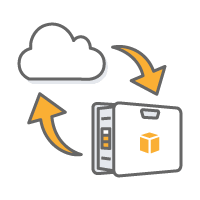
AWS Migration Hub provides an individual location to track the growth of application migrations across multiple AWS and partner solutions. This allows choosing the AWS and partner migration tools that are suitable for the process. It also provides visibility into the status of migrations across the portfolio of applications. With Migration Hub, you can view key metrics and track the progress of each application. It works regardless of the migration tools used. You get real-time updates across all migrations. This helps you quickly identify and troubleshoot issues. It also reduces the time and effort required for migration projects.
AWS Migration Hub provides a unique provision to monitor migrations in any AWS region where your migration tools are available. There is no additional cost to use Migration Hub. You only pay for the migration tools and AWS resources you consume.
Benefits of AWS Migration Hub
- Centralized Tracking – The components of migration such as the status of servers, migration of databases and other related processes can be tracked with this feature without much effort.
- Migration Flexibility – This feature provides the flexibility to use the migration tools that work best for the requirement.
- Improved Visibility – AWS Migration Hub allows to group related servers and resources that should be migrated together. Once grouped into a single application, we can easily track the progress of these resources through their entire migration lifecycle to help ensure they all migrate successfully.
Application Discovery Service
AWS Application Discovery Service helps enterprise customers organize migration projects by collecting information about their on-premises data centers.
Planning of a data center migration would include thousands of data that are deeply interdependent. Server utilization data and dependency mapping are important early stages in the migration process. AWS Application Discovery Service collects and presents such data from the servers to help a better understanding of the workloads.
The collected data is kept in an encrypted format in an AWS Application Discovery Service data store. This data can be exported as a CSV file and use it to estimate the Total Cost of Ownership (TCO) of running on AWS and to plan your migration to AWS.
Application Discovery Service offers two ways of performing discovery and collecting data about your on-premises servers:
– Agentless discovery
– Agent-based discovery
Agentless discovery can be performed by deploying the AWS Agentless Discovery Connector (OVA file) through your VMware vCenter
Agent-based discovery can be performed by deploying the AWS Application Discovery Agent on each of your VMs and physical servers.
AWS Snowball
AWS Snowball is a service for customers who want to transport terabytes or petabytes of data to and from AWS, or who want to access the storage and compute power of the AWS Cloud locally and cost-effectively in places where connecting to the internet might not be an option.
Snowball completes its execution with import and export jobs.
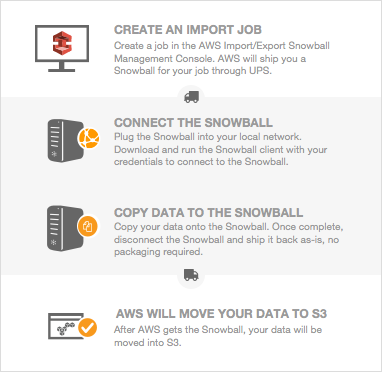
Each imported job uses a single Snowball appliance. After a job is created in the AWS Snowball Management Console or the job management API, the AWS ships a Snowball. When it arrives in a few days, we can connect the Snowball to our network and transfer the data that we want to be imported into Amazon S3 onto that Snowball using the Snowball client or the Amazon S3 Adapter for Snowball.
Each imported job uses a single Snowball appliance. After a job is created in the AWS Snowball Management Console or the job management API, the AWS ships a Snowball. When it arrives in a few days, we can connect the Snowball to our network and transfer the data that we want to be imported into Amazon S3 onto that Snowball using the Snowball client or the Amazon S3 Adapter for Snowball.
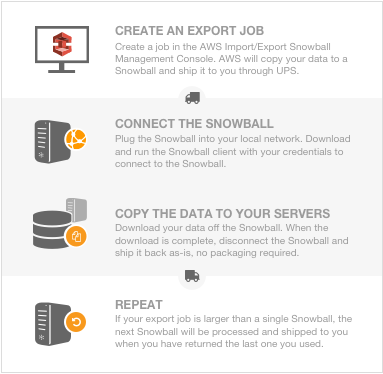
After that, AWS start exporting our data onto a Snowball, this process can take longer. Once the export is done, AWS gets the Snowball ready for pickup by our region’s carrier. When the Snowball arrives at our data center or office in a few days, we can connect the Snowball to our network and transfer the data that we want to be exported to our servers by using the Snowball client or the Amazon S3 Adapter for Snowball.
Need Help with Migration from VMware to AWS ?
SupportPRO is an AWS consulting partner and reseller of AWS cloud services. If you require help with AWS migration or any other AWS services, contact SupportPRO Server Admin
Facing issues?
Our technical support
engineers can solve it.


