


A critical vulnerability, CVE-2026-98432, has emerged within the IPv4 TCP networking stack of the Linux kernel, prompting urgent attention from hosting providers, system administrators, and DevOps professionals. Rated with a CVSS score of 9.8, this critical Linux kernel vulnerability stems from a use-after-free condition.
An unauthenticated remote attacker can potentially trigger kernel memory corruption, resulting in a complete system crash or, under certain conditions, remote code execution (RCE). The critical concern is that this Linux TCP vulnerability extends beyond individual Linux distributions or specific applications, as it resides within the fundamental code responsible for IPv4 TCP connection handling.
Consequently, any server running an affected kernel build may remain exposed, regardless of the hosting control panel or applications installed.
For administrators responsible for Linux server security, the operational approach is straightforward: identify vulnerable systems, verify whether the operating system vendor has released a patched kernel, schedule the necessary maintenance, and confirm that the updated kernel is running after reboot.
1. What Is CVE-2026-98432, and How Does the Linux TCP Vulnerability Work?
A vulnerability is a flaw, bug, or weakness in computer hardware, software, or networks that attackers can exploit to steal data, disrupt systems, or compromise security.
CVE-2026-98432 stems from a race condition in the Linux kernel. Specifically, it affects how IPv4 socket options are handled while a TCP connection is being established.
Under normal circumstances, a remote client sends a SYN packet to a server. The server receives the request and begins preparing a SYN-ACK response. However, complications can arise when certain IPv4 packets contain additional header data known as IP options. Do not confuse these with standard TCP options, as they serve different purposes.
While processing the connection, the Linux kernel manages the memory associated with these IPv4 options. The vulnerability occurs when the kernel transfers option data from the connection request socket to a newly created child socket.
The problem is a timing-related memory conflict.
If a second CPU processes a retransmitted SYN request at the same moment, it may attempt to access the same memory block.
If the kernel releases that memory before the second CPU finishes accessing it, a use-after-free vulnerability occurs.
The system then attempts to read memory that is no longer valid, potentially triggering Linux kernel memory corruption or a system crash.
The upstream developers addressed this issue by replacing the previous memory-release logic with kfree_rcu().
This change ensures that the memory remains available until active Read-Copy-Update (RCU) readers have completed their operations.
Important for Linux administrators: Do not assume your servers are protected simply because IPv6 is used or certain networking features have been disabled. Confirm the actual exposure and Linux kernel patch status with your distribution vendor.
2. Why Is CVE-2026-98432 Critical for Linux Server Administrators?
CVE-2026-98432 was disclosed in October 2026 and involves a race condition deep within the Linux kernel’s IPv4 TCP stack.
When a server processes multiple TCP connection requests simultaneously, a timing conflict may allow one CPU to release memory allocated for IPv4 socket options while another CPU is still accessing it.
This can trigger a use-after-free condition, leading to memory corruption or a kernel panic.
The vulnerability is particularly concerning because an unauthenticated attacker may be able to trigger it remotely over standard IPv4 TCP networking.
No login credentials or user interaction are required to reach the vulnerable networking path.
Unlike an application-level security flaw, this vulnerability affects the core operating system kernel.
Potential consequences include:
- Denial of Service (DoS): A kernel crash can interrupt server availability.
- Memory corruption: The kernel may attempt to access memory that has already been released.
- Remote Code Execution (RCE): Under specific conditions, exploitation may allow an attacker to execute malicious code.
Why should hosting providers pay attention?
For shared hosting environments, the impact can be significant.
A single affected bare-metal host may support dozens of customer websites, databases, and mail services. A kernel crash can therefore disrupt multiple customers simultaneously.
Servers running cPanel, Plesk, or other hosting control panels should be reviewed as part of a broader vulnerability assessment.
Hosting administrators should also address application-level security issues. Our guide to PHP2Shell security checks for cPanel, Plesk, DirectAdmin, and CWP explains why you should secure hosting environments beyond the operating system layer.
For organizations managing multiple servers, understanding Linux server exposure in hosting environments is essential to identify high-risk infrastructure and prioritize remediation.
Red Hat has classified CVE-2026-98432 as a critical security issue for affected enterprise Linux systems.
3. CVE-2026-98432 Fix: Which Linux Kernel Versions Are Affected?
Upstream Linux kernel developers released a structural patch in early October 2026, associated with commit e3f33b0a. The patch changes how the kernel releases the affected memory structure, ensuring that it is not freed until the relevant RCU grace period has completed.
This prevents another CPU from accessing memory while it is being released. The fix was subsequently incorporated into major upstream long-term support (LTS) kernel branches. However, whether a particular server has the CVE-2026-98432 fix depends on the Linux distribution, kernel package, and vendor support lifecycle.
CVE-2026-98432: Linux distribution patch status
The following table reflects the late-October 2026 status described in the original draft. These statuses are historical, not a live patch-status report; administrators must check current vendor advisories before acting.
| Linux distribution | Affected versions/status reported in the original draft |
|---|---|
| Standard upstream Linux | Versions 4.4 through versions before 7.3-rc7 were identified as affected. Fixed releases listed included 5.10.272, 5.15.223, 6.1.190, 6.6.159, 6.12.113, 6.18.56, and 7.2.10. |
| Amazon Linux 2 / 2023 | Kernel branches 5.4 through 6.18 were identified. Fixes were reported under ALAS2023-2026-3365 and ALAS2-2026-4065. |
| Debian GNU/Linux | Debian 12 (Bookworm) and Debian 13 (Trixie) were reported as affected, with fixes available through security repositories. |
| AlmaLinux | Default kernels on AlmaLinux 8, 9, and 10 were affected. Patches were in testing at the time of the original draft. |
| CloudLinux | Affected versions included 7h, 8/9 LTS, and 10, with updates in staged rollout. Standard CloudLinux 7 was reported as unaffected. |
| Red Hat Enterprise Linux | RHEL 8, 9, and 10 were affected. The original draft referenced RHSB-2026-016 while fixes were pending. |
| Rocky Linux | Default kernels on Rocky Linux 8, 9, and 10 were affected, with patches pending at the time. |
| Ubuntu Linux | Versions from Ubuntu 16.04 LTS through Ubuntu 26.10 were identified, with Canonical tracking patch availability. |
| TuxCare / KernelCare | Live-patching updates were reported as partially available, with additional Enterprise Linux builds in progress. |
Note: Several distributions, including AlmaLinux and RHEL, released additional fixes after the late-October snapshot. The table must be updated against current vendor advisories before publication.
When checking affected Linux kernel versions, administrators must also consider vendor-specific security backports.
A kernel with an older version number may already contain the necessary security fix if the distribution vendor has backported it.
For Amazon Linux environments, kernel updates are only one part of overall system security. Administrators should also review package-level vulnerabilities, such as the Amazon Linux 2 EFS utilities security update.
4. How to Check If Your Linux Server Is Vulnerable to CVE-2026-98432
Before applying a Linux kernel security patch, administrators should inventory their systems, identify potentially vulnerable servers, and prioritize remediation based on risk.
The following checks help identify the operating system, running kernel, installed packages, and available updates.
Step 1: Identify your Linux operating system
Run the following command:
cat /etc/os-release
This displays the Linux distribution and operating system version.
Step 2: Check the active Linux kernel version
Run:
uname -r
This command displays the currently running Linux kernel version.
Compare the result with the fixed kernel build published by your operating system vendor.
Step 3: Check installed kernel packages
For RHEL, AlmaLinux, Rocky Linux, and Oracle Linux:
rpm -qa | grep -i kernel
For Debian and Ubuntu:
dpkg -l | grep linux-image
These commands help identify the kernel packages installed on the server.
Step 4: Check available security updates
For RHEL-based distributions:
dnf check-update
For Debian and Ubuntu:
apt update && apt list --upgradable
Review the available packages and confirm whether the relevant CVE-2026-98432 security fix is included.
Step 5: Identify high-risk Linux servers
Beyond basic system checks, administrators should identify systems with the highest potential exposure.
Prioritize:
- Public-facing web servers handling IPv4 TCP traffic.
- Servers running cPanel, Plesk, or other hosting control panels.
- Mail servers and database backends.
- Cloud VPS instances and dedicated bare-metal servers.
- Kubernetes infrastructure and container hosts.
The objective is not simply to find outdated packages, but to determine which servers are running vulnerable kernels and are exposed to untrusted network traffic.
For a broader Linux server vulnerability assessment, read SupportPro’s guide on how to assess whether a newly published CVE affects your servers.
5. How to Fix CVE-2026-98432 on Linux Servers
When an appropriate CVE-2026-98432 kernel patch becomes available, schedule the update as soon as operationally possible.
Administrators should use their distribution vendor’s supported update procedure and plan the necessary maintenance carefully.
For RHEL-based Linux distributions
To update the kernel:
dnf update kernel
Alternatively, for systems using YUM:
yum update -y
The appropriate command depends on the operating system version and the scope of the maintenance.
For Ubuntu and Debian
Run:
apt update
apt upgrade
Before updating production systems, review the proposed package changes and verify that the security update is available through the appropriate supported repository.
Check whether you need to reboot.
On supported RHEL-based systems, run:
needs-restarting -r
If this utility is unavailable, compare the running kernel version against the installed packages and follow your distribution’s reboot requirements.
Important: Installing a patched kernel package does not necessarily mean the server is protected immediately. For conventional kernel updates, the server must reboot into the patched kernel.
For production environments, coordinated maintenance is essential to minimize disruptions.
Our Linux server administration and kernel patching services include operating system updates, kernel upgrades, and server maintenance for Linux infrastructure.
What if the CVE-2026-98432 patch is not yet available?
If vendor updates are delayed, administrators should actively reduce exposure while monitoring security advisories.
Recommended precautions include:
- Monitoring vendor security announcements.
- Closing unnecessary public ports.
- Reviewing and tightening firewall rules.
- Restricting access to services accepting untrusted IPv4 TCP connections.
- Planning remediation as soon as a vendor-approved patch is available.
Temporary CVE-2026-98432 mitigation using nftables
Red Hat has described a temporary mitigation approach using nftables to filter incoming IPv4 TCP packets carrying IP options.
The original draft provided the following example configuration:
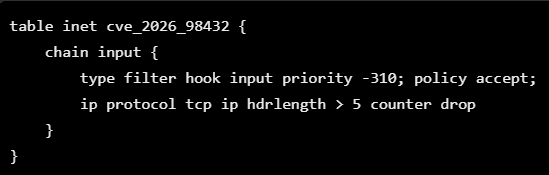
Technical review required: Validate this example against the vendor’s exact guidance and the target system before using it. Do not deploy it to production without confirming the syntax, rule behavior, and impact on legitimate network traffic.
Save the approved configuration to a file named:
cve-2026-98432.nft
The commands from the original draft are:
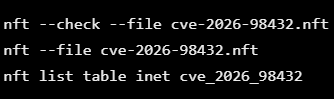
This is a temporary risk-reduction measure, not a substitute for installing the Linux kernel security patch.
Test firewall changes against legitimate production traffic before deployment.
After confirming that the patched kernel is running and the temporary configuration is no longer required, the original draft specifies:
nft delete table inet cve_2026_98432
For urgent infrastructure issues, SupportPro provides emergency server support, including security patching, server hardening, and vulnerability remediation.
6. How to Verify the CVE-2026-98432 Kernel Patch After Reboot
After installing the security update, administrators must verify that the server is running the patched kernel. A successful package installation alone does not confirm complete remediation.
Verify the active kernel version
Run:
uname -r
Confirm that the output matches a vendor-approved patched Linux kernel version.
Check installed kernel packages
For RHEL-based systems:
rpm -qa | grep -i kernel
For Debian and Ubuntu:
dpkg -l | grep linux-image
Verify uptime and reboot status
Run:
uptime
who -b
These commands provide information about system uptime and the most recent boot.
Check failed systemd services
Run:
systemctl --failed
Review any services that failed to start after the reboot.
Verify active listening ports
Run:
ss -lntp
Confirm that expected network services are listening on the appropriate ports.
Review kernel warnings and errors
Run:
journalctl -k -p warning -b
Review the kernel logs for unexpected warnings or errors after the update.
These post-update Linux kernel verification steps help confirm that the server has restarted successfully and that the expected services are operational.
For hosting providers managing multiple servers, consistent patching and verification are particularly important.
You can also read on how poor server management increases downtime and security risks, delayed updates and incomplete maintenance practices can create unnecessary operational risks.
Protecting Linux Servers Against CVE-2026-98432
Leaving a critical kernel vulnerability such as CVE-2026-98432 unpatched across a multi-node fleet or cloud infrastructure can create significant security and availability risks. However, rushing kernel updates without proper planning may cause production interruptions or leave gaps in remediation verification. For Linux server administrators and hosting providers, the priority is to identify affected systems, verify the correct vendor patch, schedule maintenance, and confirm successful remediation.
How SupportPro Can Help You
SupportPro can assist organizations with Linux server vulnerability assessment, kernel patch management, and post-update verification.
Our Linux server support services include:
- Linux Server Inventory and Exposure Review: Identifying active kernel versions across bare-metal servers, virtual machines, and container hosts.
- Kernel Patch Audits: Comparing installed kernel builds against official vendor advisories and applicable security fixes.
- Planned Kernel Upgrades: Coordinating supported kernel updates, maintenance windows, live-patching options where available, and rolling reboots to minimize service disruption.
- Post-Patch Security Verification: Confirming the active kernel version, checking system health, and validating that required services have recovered.
Organizations requiring ongoing assistance can explore SupportPro’s managed server support and maintenance plans.
Need help checking or patching CVE-2026-98432 on your Linux servers?
Contact SupportPro to discuss your infrastructure security requirements and available technical support options.
Frequently Asked Questions About CVE-2026-98432
What is CVE-2026-98432?
CVE-2026-98432 is a critical Linux kernel use-after-free vulnerability affecting IPv4 TCP connection handling. It can cause memory corruption, kernel crashes, and potentially remote code execution under specific conditions.
How do I check whether my Linux server is affected?
Run uname -r to identify the running kernel and cat /etc/os-release to identify the Linux distribution. Compare the results with the official vendor advisory and fixed kernel package information.
Which Linux kernel versions are affected by CVE-2026-98432?
The vulnerability affects Linux kernel code introduced in version 4.4. The exact affected and fixed package versions depend on the distribution, kernel branch, and vendor security backports.
Is CVE-2026-98432 fixed in Ubuntu?
Ubuntu’s patch availability depends on the release and the security update channel. Administrators should consult Canonical’s latest advisory to verify whether an approved CVE-2026-98432 Ubuntu patch is available for their system.
Can CVE-2026-98432 affect cPanel or Plesk servers?
Yes. Servers using cPanel or Plesk may be affected if they run a vulnerable underlying Linux kernel. Updating the hosting control panel alone does not resolve the kernel vulnerability.
Do I need to reboot after applying the Linux kernel patch?
For conventional kernel package updates, you generally need to reboot to activate the patched kernel. Administrators should verify the active kernel version after restarting the server.
Facing issues?
Our technical support
engineers can solve it.


